
The Evolution of AI Agents
I budget for a CRM with AI lead discovery by adding subscription fees, prospect data, AI usage, and outreach charges - not just the advertised seat price. For reference, K3X lists $399/month for unlimited seats and 400,000 monthly credits, while Salesforce and HubSpot costs depend on seats, plans, and added services.
My comparison starts with cost per verified, usable prospect. I also keep <u>one-time setup and migration costs separate</u> so I can compare monthly spending without understating the first-year bill.
K3X vs. competing CRMs: pricing and lead discovery
K3X offers one team subscription with a shared credit pool; most competitors charge per seat, with AI add-ons and separate data costs. K3X combines discovery and outreach in one credit-based workflow, while legacy CRMs often separate those functions through add-ons and extra admin steps.
Check whether the price includes net-new prospect discovery, rather than only scoring or enriching existing records. Discovery costs usually depend on credits, data access, and add-ons - not just the CRM license.
Platform | Selected plan and billing | AI + net-new prospect discovery | Additional fees to verify |
|---|---|---|---|
K3X | Adaptive: $399/month, unlimited seats; 400,000 monthly credits | Built-in database with 200M+ records; prompt-driven agents | Optional top-up credits start at $99 per 100,000; contact reveals, AI actions, calls, and texts consume credits |
Salesforce | Sales Cloud: $100–$165/user/month base[4] | Confirm Einstein/Agentforce entitlement and prospect-data access | Quote-based setup |
HubSpot | Breeze AI adds $50–$150/user/month[4]; confirm prospect-data access | Onboarding can add $2,500–$10,000[5] | |
Pipedrive | Per-seat subscription | Check whether discovery requires a separate data source | Seat minimums and external-data fees |
Zoho | Per-user subscription | Confirm Zia entitlement and the service supplying new contacts | Enrichment limits and separate data fees |
monday.com | Seat-based subscription | Confirm AI credits and external discovery-data requirements | Minimum billable seats and credit purchases |
Close | Per-user subscription | Confirm AI access and the source of net-new contacts | Calling, SMS, phone-number, and external-data charges |
Attio | Per-user subscription | Confirm AI usage and whether enrichment includes discovery | Credit charges and a separate prospect database |
The details below explain costs beyond the headline price. Estimate monthly and annual spending by team size and prospecting volume to see how different AI CRM tools affect your bill.
K3X: unlimited seats with usage-based credits
K3X’s published pricing includes platform access and 24/7 chat support. Purchased top-up credits roll over while the subscription stays active; the included monthly allowance does not.
If credits run out, the CRM remains accessible, but actions that consume credits pause.
Salesforce and HubSpot: plans, AI, and added fees
Salesforce and HubSpot charge per seat, with AI and data costs determined by the package and entitlements. Check Salesforce’s Einstein/Agentforce entitlement and HubSpot’s Breeze AI charges separately from prospect-data access.
Both often involve more admin work when AI, data, and outreach are billed separately.
Pipedrive, Zoho, monday.com, Close, and Attio: seats and data costs
For these platforms, check whether native tools discover new prospects or only enrich existing records. A separate prospect database adds recurring costs even if the CRM includes AI.
Compare data allowances, seat fees, credit charges, and communication costs - not AI access alone.
Monthly and annual cost estimates by team size
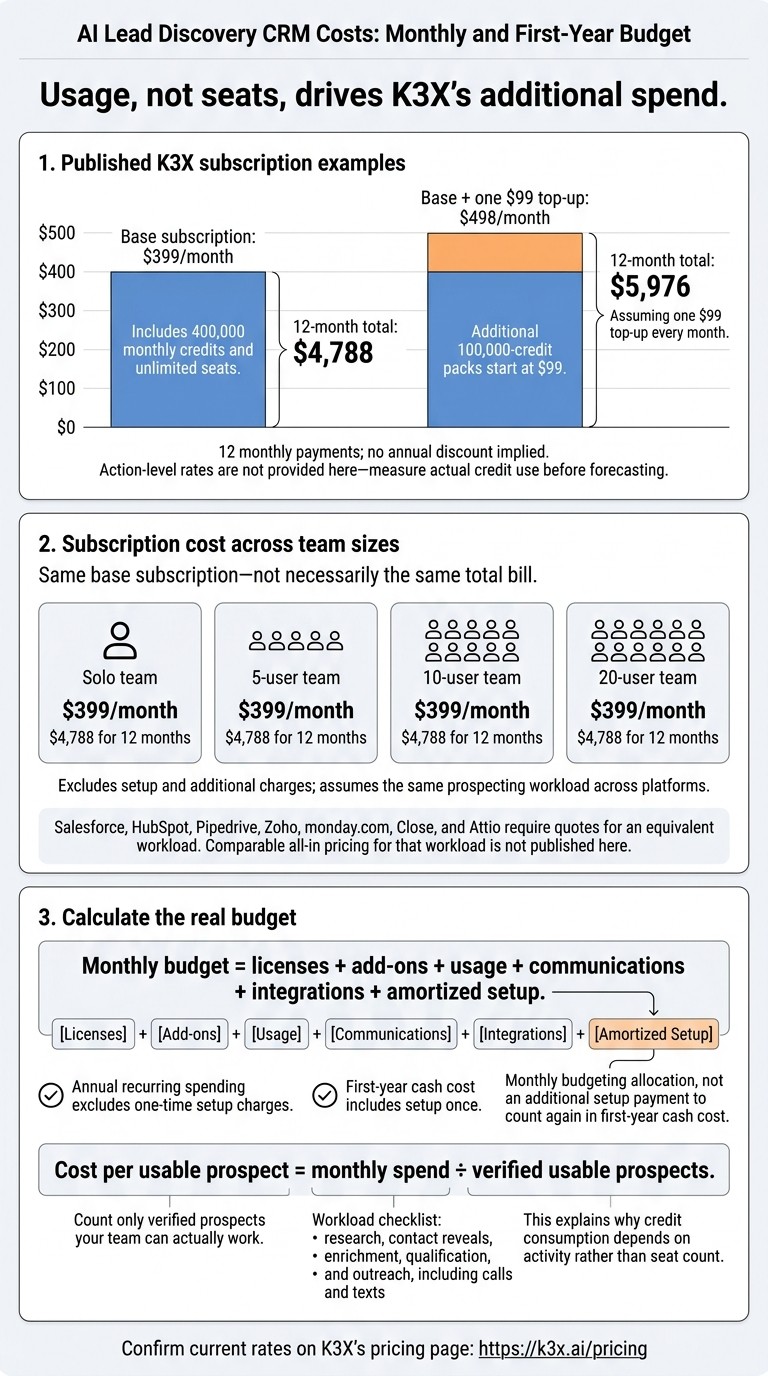
AI Lead Discovery CRM Costs: Monthly and First-Year Budget
Turn the workload defined above into monthly and first-year costs. Usage, not seats, drives K3X’s additional spend.
Define your monthly prospecting workload
Estimate how many prospects your team needs to research, qualify, and contact each month. Forecast the actions needed for research, contact reveals, enrichment, qualification, and outreach, including calls and texts.
Calculate K3X subscription and credit costs
Additional 100,000-credit packs start at $99. Action-level rates are not provided here, so measure actual credit use before finalizing your forecast.
One $99 top-up brings the monthly bill to $498. Adding one every month brings first-year spending to $5,976. The base cost of $4,788 covers 12 monthly payments; it does not imply an annual discount. Confirm current rates on K3X’s pricing page.
Calculate total cost and cost per usable prospect
The totals below assume the same prospecting workload across platforms. Each cell shows monthly subscription cost / 12-month subscription cost, excluding setup and additional charges.
Platform | Solo team | 5-user team | 10-user team | 20-user team |
|---|---|---|---|---|
K3X Adaptive | $399 / $4,788 | $399 / $4,788 | $399 / $4,788 | $399 / $4,788 |
Salesforce, HubSpot, Pipedrive, Zoho, monday.com, Close, and Attio require quotes for an equivalent workload. Comparable all-in pricing for that workload is not published here.
K3X meters usage and charges extra for top-ups. You can cancel anytime; setup charges are not specified. Compare seat-based CRMs with K3X’s usage-based model using the full monthly budget, not subscription costs alone.
Monthly budget = licenses + add-ons + usage + communications + integrations + amortized setup.
Annual recurring spending excludes one-time setup charges. First-year cash cost includes setup once.
Cost per usable prospect = monthly spend ÷ verified usable prospects. Count only verified prospects your team can actually work.
Choose a pricing model for your prospecting needs
Use the totals above to find the lowest-cost model that supports your prospecting volume. Choose K3X for shared, high-usage prospecting; choose a seat-based CRM when lighter usage or your existing setup makes it cheaper overall. Solo users may pay more than needed for a team subscription.
Platform | Best fit | Extra costs |
|---|---|---|
K3X | Teams sharing discovery and outreach | Credits beyond the included allowance |
Salesforce | Established teams with configured sales workflows | AI, prospect data, and implementation |
HubSpot | Teams already combining marketing and sales in HubSpot | Upgrades, usage, and external prospect data |
Pipedrive | Small teams needing pipeline management and light discovery | Third-party prospect data and integrations |
Zoho | Teams already using the Zoho suite | External prospect data and configuration |
monday.com | Teams with existing sales tracking workflows | Third-party data for new prospects and integrations |
Close | Teams with established calling workflows and light discovery | Prospect data and communications |
Attio | Existing users needing light discovery | Prospect data and usage credits |
When integrated discovery and outreach can cut costs
K3X combines search, qualification, outreach, and updates in one workflow. This may reduce separate subscriptions and handoffs, but setup and usage charges still apply.
Salesforce and HubSpot may cost less if your team already has working routing, outreach, and data contracts. Pipedrive, Zoho, or monday.com may suit teams that already have a usable prospect database. Switching from productive Close or Attio workflows just to combine tools can wipe out the savings.
Test prospect quality, usage, and setup before buying
Run the same 250 known contacts through each shortlisted tool before signing[1]. Compare match rate, usable contacts, and credits consumed.
Check email and calling limits, credit expiry, renewal terms, and support before committing. Confirm that required integrations are available now and work with your data, especially while K3X’s advertised connections are still rolling out.
Once you choose a model, include migration and overlapping subscription costs in your total before switching.
Plan your CRM switch without surprise costs
Once you compare CRM alternatives and choose a pricing model, calculate the cost of switching. Budget for the move, not just the plan: include the subscription, migration, setup, and temporary overlap.
Budget for migration and subscription overlap
Allow 1–3 months of subscription overlap while you export records, map fields, remove duplicates, and transfer pipelines.[5][6] Track internal labor separately from paid onboarding; consulting can cost $1,000–$10,000.[5][8][7]
Check export limits, fees, and cancellation deadlines before scheduling the move. Confirm that the connectors you need are live. If your team relies heavily on Salesforce workflows, HubSpot connections, or Close calling processes, budget for replacing them.
Confirm your budget before signing
Get written confirmation of every charge that affects your first-year total before signing. Check seat counts, billing frequency, included credits, actions that consume credits, overages, rollover, calling and texting charges, integrations, and onboarding.
Use K3X’s 7-day, no-card trial after a 1:1 demo to test your monthly estimate with actual prospecting tasks and verify usable prospects.
Calculate the first-year subscription cost from the quoted plan price, then add overages, migration, setup, and overlap. Keep paid onboarding as a separate line item so it doesn’t get missed.
FAQs
How can I predict my monthly credit usage?
Estimate your monthly credit usage before choosing a plan. Map each step in your enrichment workflow and identify actions that consume credits, such as finding emails, verifying data, and generating AI content. Add up the credits used per lead across your data sources and AI steps, then multiply that total by your expected monthly lead volume [1][2][3].
Include a buffer for testing and workflow changes. Going over a pricing tier’s limit can be costly, so model your workflow’s credit usage before selecting a plan [1][4].
When is unlimited-seat pricing worth it?
Unlimited-seat pricing is worth it when a growing team makes per-seat fees too costly, or when managers, RevOps, and support staff need access but don’t need full-time prospecting capabilities. Flat-fee plans often cost less for teams with more than five to ten users and make budgeting more predictable.
Check that the plan includes the features and lead-discovery credits your team needs. Some platforms limit advanced features or team access to higher-priced tiers.
How do I verify prospect quality before buying?
Use a free trial or starter tier to test a sample of your pipeline. Check data accuracy and enrichment quality, including email bounce rates and incorrect phone numbers [3][1].
Before choosing a plan, estimate monthly credit use by multiplying the number of data sources queried per lead by your expected monthly lead volume [2]. Check the in-app credit preview before large runs, and confirm whether failed lookups consume credits [4].