
The Evolution of AI Agents
Yes - ChatGPT integration can reduce manual CRM data entry, but I would count savings only after fact-checking, corrections, and CRM entry. I would compare ChatGPT, K3X, and existing CRM tools by <u>time to an approved action</u>, not drafting speed.
The cited benchmarks put CRM-connected email drafting at under 1 minute versus 4–6 minutes manually.[3] I would treat those figures as pilot targets, not promises, and require human approval before sending messages or changing deal records.
How I Made ChatGPT Talk Directly To My CRM System!
Where Do Sales Workflows Waste Time?
Sales workflows waste time at handoffs: gathering facts, drafting emails, reviewing call notes, preparing follow-ups, and updating CRM records. Manual data entry takes approximately 13% of a rep’s week, and sales teams use an average of eight standalone tools.[5]
Research often involves checking LinkedIn, company sites, and opportunity records.[6] After a call, reps may enter the same information up to four times.[5] When records are missing, they may also need to piece together buyer commitments from email threads and Slack before taking action.[7]
Manual vs. ChatGPT-Assisted Workflows
Standalone ChatGPT can rewrite text, but reps still have to move context and results manually.[3] An integrated workflow can retrieve permitted records and suggest next actions and workflow updates.[2] When comparing K3X versus a basic ChatGPT connection, test whether the workflow removes these handoffs.[2][7]
Workflow stage | Manual process | ChatGPT-assisted process | Efficiency measure | Human review |
|---|---|---|---|---|
Prospect emails | Research, copy facts, and draft | Retrieve allowed context and draft | Minutes to approved email | Facts, relevance, and tone |
Call summaries | Review notes and retype details | Structure transcript into notes | Minutes to approved summary | Commitments, owners, and dates |
Follow-ups | Reassemble email and CRM context | Combine connected records into a draft | Meeting-to-approval time | Promises and next steps |
CRM updates | Re-enter details across fields | Propose changes and execute after approval | Time to verified saved record | Correct record, stage, and dates |
Measure review and correction time, not just task completion. A fast draft that needs extensive repairs - or leaves the CRM unchanged - doesn't remove the bottleneck. Require approval before sending messages or updating records.[2][5] The next task-level question is which sales work gains the most from this approach.
Which Sales Tasks Can ChatGPT Help With?
ChatGPT is best suited to text-heavy sales tasks that end with human review. Start with work that takes reps the most effort: email drafts, call summaries, and follow-up drafts.
Prospect Emails: Faster Drafts, Verified Facts
Teams that standardize email drafting with CRM-connected language models (enabled via CRM integrations) can cut preparation time from 4–6 minutes per email to under 1 minute.[3] Provide verified account facts and approved product claims, then use a prompt such as:
“Professional and direct. Maximum five lines. Use only supplied facts. End with one clear next action.”
Before sending, check personalization, messaging rules, and fit with the sales stage.[2][3]
Sales-Call Summaries: Complete, Structured Notes
ChatGPT can turn an authorized call transcript into structured notes covering pain points, buying signals, objections, commitments, and next steps with owners.[12] Require evidence from the transcript and label missing information not stated.
Keep any proposed deal stage separate from confirmed facts. Review the notes for omissions, incorrect owners, and suggestions that participants never agreed to.[2][12]
Follow-Ups: Less Time From Meeting to Approval
Use approved notes to draft a recap email and follow-up message that reflect the buyer’s language and the rep’s tone. Clearly label proposed next steps unless the buyer has already agreed to them.
Measure time from meeting to approved follow-up, including corrections - not just generation speed.[2][5] Before sending, verify commitments, dates, capabilities, and tone.[5] If the task also changes CRM data, apply stricter accuracy checks and approval rules.
Can ChatGPT Update CRM Records Accurately?
Yes - but accurate extraction doesn’t guarantee accurate CRM updates. ChatGPT can turn notes into draft fields for stakeholders, budget, timeline, risks, next steps, and stage. Label each field Observed, Inferred, or Proposed, leave missing items blank, and show supporting evidence for review before saving.[2] Test CRM write accuracy separately from draft quality.
Even correctly extracted facts can lead to errors when saved. The model may turn a suggestion into a commitment, assign an action to the wrong stakeholder, or update the wrong record. Before saving, match the contact and deal, check existing values, and flag conflicts rather than overwrite confirmed data. Stale CRM data and sync delays can also cause duplicate updates or emails.[2][13]
Compare manual and ChatGPT-assisted updates using field accuracy, omitted facts, correction time, and approval time. Time savings count only when updates are fast, accurate, and approved - especially when a draft changes live deal data.[2][6]
Which CRM Changes Require Approval?
Require human confirmation for changes to deal stage, close date, forecast category, amount, qualification status, and customer commitments. Use a draft-first workflow: the AI prepares a visible change set, and a rep approves the save action.[2][6]
For K3X-style MCP workflows, enforce permissions at the tool level and have a rollback procedure ready before enabling automated writes.[5][6]
K3X vs. a Basic ChatGPT Integration
A basic ChatGPT integration still leaves reps gathering context, copying drafts, and entering updates by hand. K3X adds workflow automation, though teams must configure permissions and approvals.[2][5] The next section compares K3X with Salesforce, HubSpot, Pipedrive, Zoho, monday.com, Close, and Attio on setup time, admin effort, and cost.
Compare approved time saved, not feature count. Include research, review, corrections, and verified CRM updates in that calculation.
Key feature | Basic ChatGPT drafting | K3X |
|---|---|---|
Data retrieval | Rep pastes notes or uploads files | Connected access to permitted records; built-in prospecting database |
Workflow rules | Rep supplies prompt instructions in chat | Prompt-based agents and visual workflow configuration |
Sales actions | Rep copies text and creates tasks manually | Agents support task creation, outreach, and CRM updates |
Approval | Rep reviews before manual entry | Teams configure review before writes or sends that require approval |
Pricing model | ChatGPT subscription or API costs; existing CRM costs remain separate | Team subscription with included credits and optional top-ups |
Turn Plain-Language Requests Into Sales Actions
K3X supports prompt-based agents for qualification, outreach, meeting booking, and data entry. A prompt sets the goal; visual workflow configuration defines the triggers, actions, and logic. Pipelines and activity logs help teams track results.[5]
Before granting write access, configure required fields, record matching, and task ownership. Start in read-only or draft mode to check the workflow first.[5]
K3X’s built-in database contains 200M+ records, including growth signals and email verification status, which can reduce prospect research time.[11] Unlike basic drafting, its prompts can trigger CRM actions. Measure whether those actions save approved time across the full workflow.
ChatGPT Connections, MCP, Webhooks, and Credits
K3X supports MCP access through ChatGPT or Claude and asynchronous webhook connections with Zapier, Make, and n8n to reduce handoffs. Confirm access, permissions, and supported actions before testing.[11] Its advertised 3,000+ integrations are rolling out, so check availability and credit costs before assessing whether a connected workflow can scale.[11]
Adaptive costs $399/month for unlimited seats and 400,000 monthly credits. Top-ups start at $99 for 100,000 credits. AI actions, contact reveals, calls, and texts consume credits; purchased credits roll over while the plan remains active.
If credits run out, the CRM remains accessible, but actions that consume credits pause. Track credits per approved workflow alongside review time.
The next comparison weighs these workflow savings and usage costs against the setup and administration required by competing CRMs.
K3X vs. Other CRMs: Features, Setup, and Cost
K3X fits teams that need to turn sales context into approved actions, rather than just draft text. When comparing it with basic ChatGPT workflows or other CRMs, measure the ROI of AI in sales operations by calculating the total cost of a completed, approved workflow, including configuration, review, and corrections - not just subscription fees.
K3X’s prompt-to-action model connects prospecting, outreach, and CRM updates in one workflow. Teams can use this model to set up CRM workflows that handle complex interactions automatically. Salesforce and HubSpot offer broader sales and marketing ecosystems, while Pipedrive, Zoho CRM, monday.com, Close, and Attio serve different workflow needs. The comparison below shows how each platform supports the path from a prompt to an approved email, task, or CRM update.
Pricing note: These prices come from the supplied source material. Confirm competitor tiers, billing terms, AI add-ons, and usage limits before publication.
Platform | AI and automation | Setup considerations | USD pricing and usage limits supplied | Best-fit outcome |
|---|---|---|---|---|
K3X | Native prompt-based agents; MCP access through ChatGPT or Claude | Configure context, fields, triggers, permissions, and approvals | $399/month per team, unlimited seats; 400,000 monthly credits[4] | Teams linking prospecting with agent-led sales actions |
Salesforce | Native Einstein and Agentforce; official ChatGPT access through MCP | Custom objects, permissions, and automation may need admin expertise and dedicated setup; initial setup can take up to two days, even for technical users[13] | Base pricing not supplied; Agentforce Sales in ChatGPT requires the Agentforce for Sales Add-on or Agentforce 1 Edition[4] | Teams with dedicated admins to handle setup and governance |
HubSpot | Native sales AI; official ChatGPT MCP connection available | Align sales workflows with marketing data and ownership | Sales Hub Starter from $15/seat/month; Sequences require Professional or higher[11][14] | Teams whose sales process already relies on marketing data |
Pipedrive | Pipeline automation; community MCP connections | Define stages, fields, and automation triggers | Pricing not supplied in the provided material | Teams managing a focused sales pipeline |
Zoho CRM | Native Zia plus workflow automation | Configure fields, rules, and cross-suite connections | Pricing not supplied in the provided material | Teams connecting sales workflows with a broader business suite |
monday.com | Configurable boards and workflows | Map boards, statuses, ownership, and triggers | Pricing not supplied in the provided material | Teams coordinating work through configurable boards |
Close | Calling, email, and sales engagement; community MCP connections | Configure communication channels and engagement workflows | Pricing not supplied in the provided material | Reps handling most sales activity through calls and email |
Attio | Flexible objects, enrichment, and workflows | Define the data model and workflow rules | Pricing not supplied in the provided material | Teams needing custom objects and fields |
K3X combines team pricing with metered usage.[4] Salesforce offers deeper enterprise customization, but it also requires more configuration and governance work. HubSpot connects marketing and sales beyond AI drafting; its $15 Starter tier is not an equivalent automation package, because Sequences require Professional or higher.[11][14]
Staying with Salesforce or HubSpot may make more sense when existing integrations already support the sales process. Compare time saved per approved workflow after accounting for setup, review, corrections, and rework. That measurement helps determine whether shorter workflow time offsets the platform’s setup and governance overhead.
When Is Integration or Switching Worth the Cost?
Integration is worth the cost only when repeated tasks save time after review, corrections, and running costs. Once the workflow is proven, measure the time from request to approved action for call summaries, follow-ups, and CRM updates using permitted data.
Choose K3X when moving context between ChatGPT and your CRM slows the work. Keep your existing CRM when its workflows already work, and delay expansion if stale records or manual cleanup cancel out the savings.[2][3][7]
Option | Workflow pain it addresses | Decision trigger |
|---|---|---|
ChatGPT assistance | Slow one-off drafts and meeting briefs | Little setup, but manual handoffs remain.[8] |
K3X | Context transfers between prospecting, drafting, and CRM actions | Use when removing handoffs shortens the time to an approved action |
Salesforce / HubSpot | Fragmented enterprise data and pipeline management | Use for governance and forecasting |
Pipedrive / Zoho / monday.com | Repetitive tasks within an established pipeline | Use when the current pipeline already fits |
Close / Attio | Communication or record-management handoffs | Use when execution speed is the bottleneck |
Calculate Net Time Saved and Break-Even
Net time saved = manual time − AI draft time − review time − corrections. Track a 30-day manual baseline, then measure the same tasks through final approval.[9] Include context preparation and CRM entry in both measurements: a fast draft is not an approved workflow.
Multiply verified monthly hours saved by the employee’s loaded hourly cost, including benefits. Then subtract subscriptions, integration services, extra credits, maintenance, and administration.
K3X costs $399/month for the team, including 400,000 credits. Optional 100,000-credit top-ups start at $99. Measure actual credit use and account for Webhooks/MCP setup and approval rules.
Calculate setup and migration costs separately: one-time transition cost ÷ positive monthly net benefit = payback period in months. Treat labor savings as capacity value, not guaranteed revenue.[9]
Plan Migration With Less Disruption
Before switching, inventory integrations, permissions, custom fields, activity history, and automations. Clean duplicate and stale records, map fields, and test imports and proposed actions. Verify the integrations you need; K3X’s 3,000+ integrations are still rolling out.
Run one parallel pilot with a named owner, trained users, and a fixed scope. Start read-only, then test drafts and approved writes.[1][2] Set acceptance criteria for net time saved, required-field accuracy, correction rates, and follow-up speed.
Keep the existing CRM as the system of record during testing and prevent duplicate sends. Document how to disable connections and restore changed records. Expand only when approved workflow savings hold up under these controls; otherwise, stop the switch and fix the workflow or data first.
What Privacy and Quality Controls Are Needed?
Verify privacy settings, limit access, and require approvals before connecting K3X or ChatGPT. Time savings matter only if the workflow stays compliant, auditable, and accurate.
Check data-processing terms, retention, training settings, and access permissions. Verify the MCP connector’s publisher, permissions, and audit logs. Redact sensitive information before sending it to an external model, and do not store confidential deal terms or discount approvals in ChatGPT Memory.[3][8]
Limit access to the accounts, documents, and fields the workflow needs. Review each connector separately: vendor-supported Salesforce and HubSpot connections differ from community-maintained Pipedrive and Close connections.[2][11]
Before recording or transcribing calls, confirm applicable U.S. federal and state rules for recording, calling, texting, and email. Have legal counsel confirm the requirements for each state and channel before enabling automated outreach.[8]
Require approval for outbound sends and CRM writes that change stage, close date, amount, or customer commitments. Check names, dates, prices, and claims against source records. Give contract terms, discounts, and forecast changes stricter review to avoid costly corrections.[2][8]
Keep logs of source material, proposed changes, approvers, and actions. Maintain a tested rollback path for CRM edits. Review 10% of outputs each week, and check that data is current and screen for prompt injection before expanding automation.[2][6][8] Put these controls in place before measuring approved results, correction time, and follow-up speed.
How to Test Sales Workflow Efficiency
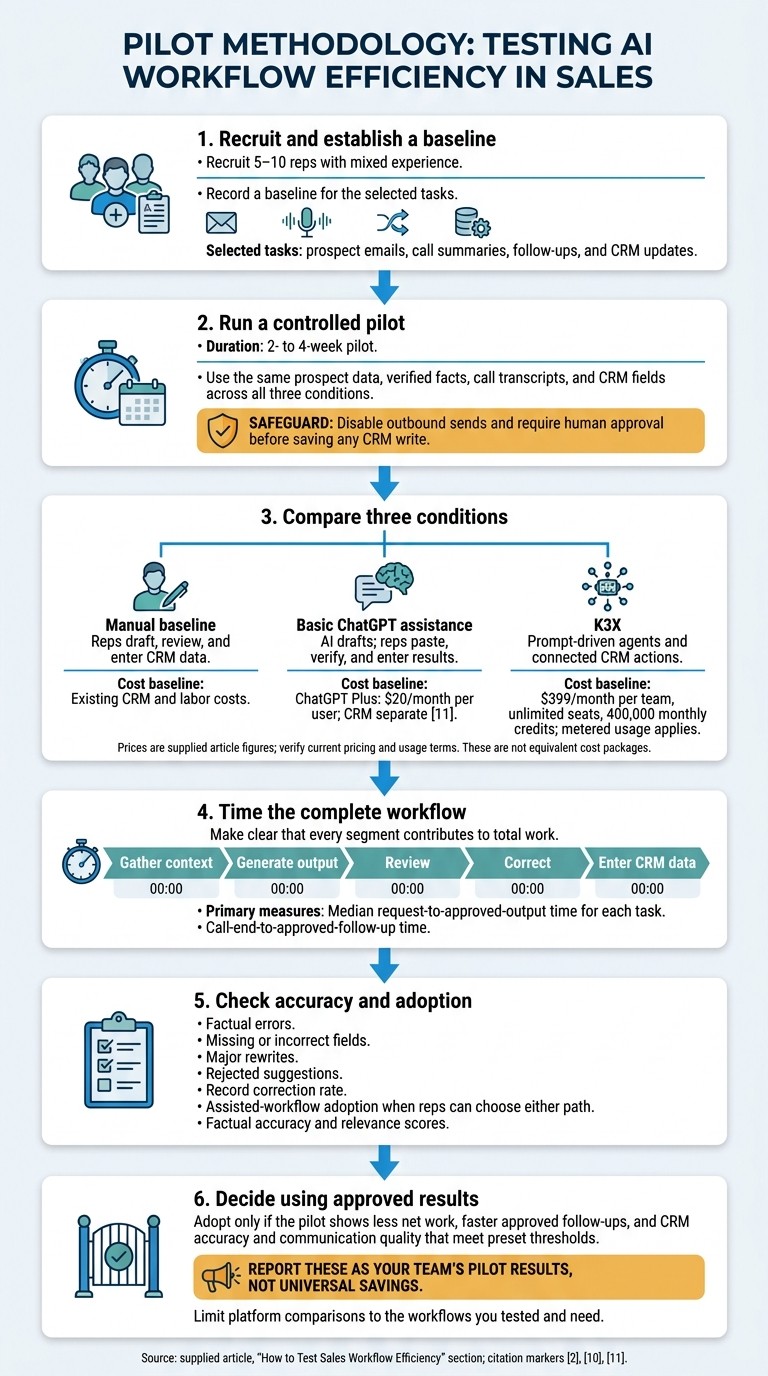
How to Test ChatGPT Sales Workflow Efficiency
Test whether ChatGPT reduces total work - not just drafting time - with a short pilot that compares the same tasks across manual, ChatGPT, and K3X workflows.[2]
Recruit 5–10 reps with mixed experience and record a baseline for the selected tasks. Run a 2- to 4-week pilot using the same prospect data, verified facts, call transcripts, and CRM fields across all three conditions. Disable outbound sends and require human approval before saving any CRM write.[10]
Test condition | Workflow being tested | Cost baseline |
|---|---|---|
Manual baseline | Reps draft, review, and enter CRM data | Existing CRM and labor costs |
Basic ChatGPT assistance | AI drafts; reps paste, verify, and enter results | ChatGPT Plus: $20/month per user; CRM separate[11] |
K3X | Prompt-driven agents and connected CRM actions | $399/month per team, unlimited seats, 400,000 monthly credits; metered usage applies |
Compare speed, accuracy, and the time and effort required for approval.
Measure Approved Results, Not Generation Speed
Measure median request-to-approved-output time for each task and call-end-to-approved-follow-up time. Use timestamps to separate time spent gathering context, generating output, reviewing, correcting, and entering CRM data.[2]
Count factual errors, missing or incorrect fields, major rewrites, and rejected suggestions. Track the record correction rate and assisted-workflow adoption when reps can choose either path. Score outputs for factual accuracy and relevance.
Final Assessment: Less Work, Same Quality
Adopt a workflow only if the pilot shows less net work, faster approved follow-ups, and CRM accuracy and communication quality that meet preset thresholds. Report these as your team’s pilot results, not universal savings.
For prospect emails, call summaries, follow-up emails, and CRM updates, limit K3X comparisons to the workflows you tested. Compare K3X only against the workflows you need from Salesforce, HubSpot, Pipedrive, Zoho, monday.com, Close, or Attio.
FAQs
Which sales task should we automate first?
Start with frequent, predictable tasks that need little judgment and have errors that are easy to fix [1]. Follow-up email drafting is the most recommended starting point for fast, visible results [2]. CRM logging and note-taking save the most time - about 6 hours per rep per week - and help maintain data quality [3].
Choose one narrowly defined output and set its required fields and approvals. Measure time saved and accuracy before moving to more complex workflows [2][4].
How can we prevent AI from acting on malicious instructions?
Set strict controls to block malicious instructions, including prompt injection hidden in emails or documents [1]. Require human confirmation before AI sends, edits, deletes, or submits information. Restrict AI to narrow, clearly defined tasks and disconnect apps it doesn’t need [1].
Use least-privilege access and keep a full audit trail of every action. Require review of each proposed CRM update before it becomes a permanent record [2][3].
How do we keep human review from becoming a bottleneck?
Start with one frequent task that requires little judgment, has objective answers, and produces errors that are easy to spot [1]. For follow-up email drafting, refine the prompt until 80% of drafts need no major edits [2].
Let AI draft, but require human approval instead of full autonomy [3][4]. Spot-check 10% of outputs each week [1], and include clear citations and audit trails so reviewers can verify the work quickly [5][6].