
The Evolution of AI Agents
I automate lead discovery by turning my ideal customer profile into filters, qualifying companies before finding contacts, and sending verified, duplicate-free records to the right CRM owner. I score company fit separately from buying signals: hiring or funding can help rank outreach, but neither proves purchase intent.
I compare K3X with Salesforce, HubSpot, Pipedrive, Zoho, monday.com, Close, and Attio based on data access, setup work, and total workflow cost - not subscription price alone, and reduce manual data entry through automation. K3X combines discovery and CRM actions; keeping another CRM may make more sense when its routing and integrations already meet my team’s needs.
Before launch, I use a 15–50-lead pilot and audit every record when the sample is below 30, following this guide’s testing rules. My priority is <u>verified data and controlled CRM updates</u>, not a larger list.
Build a B2B Lead Gen System in Under 30 Minutes (n8n Free Template)
Define Your ICP and Lead-Quality Rules
Convert your ICP into explicit filters, exclusions, and data checks before choosing tools. Keep each rule, its source, and its treatment of missing data in one shared rulebook.[11] The rules should specify which companies to find, skip, or send for review.
Turn Your Ideal Customer Profile Into Filters
Define firmographic, technographic, and buyer-role filters around the industries, company sizes, geographies, tech stacks, and decision-maker titles you serve. Include a revenue band only when it affects qualification.[9] Define a negative ICP to exclude accounts you will never sell to.[11][9][4]
Rule | Acceptable value | Exclusion or review condition | Evidence source | Treatment |
|---|---|---|---|---|
Industry | Named industries you serve | Unrelated industries; competitors | Company website plus data provider | Fit gate |
Employee count | Defined headcount range | Outside range; conflicting estimates require review | Company-level data provider | Fit gate |
Location | Target geography | Outside target geography; unknown location requires review | Company website or provider | Fit gate |
Tech stack | Verified required software | Incompatible system; unknown requires review | Technographic provider or company confirmation | Hard gate |
Buyer role | Target decision-maker title matched with Boolean logic | Assistant, student, or unrelated function; less than 30 days in role | Professional profile | Contact gate |
Suppression | No suppression match | Existing customer, competitor, agency, consultant, student, or inactive profile | CRM and suppression list | Hard exclusion |
Enrich only contacts tied to companies that pass these gates. Missing technology data requires review; it does not establish fit.[8][12] Route leads only when their email confidence score is at least 0.7, and keep bounce rates below 3%.[4][8]
Score Company Fit and Buying Signals Separately
Use company fit to determine qualification and AI lead-scoring tools to rank outreach - not to override fit rules.[7][13] Update firmographics quarterly and signals monthly.[7]
Set activity windows: job changes within 30–90 days, funding within 3–6 months, and tech stack changes within 60–90 days.[7] These windows guide outreach timing; they do not prove that a company is ready to buy.
Before launch, test the rules against previously accepted and rejected leads. Adjust exclusions or scoring weights if rejected accounts pass or good accounts fail, and inspect five records before export.[13] Apply these rules as filters and routing logic in the company-to-contact workflow.
Choose Lead Sources and Compare Tools
K3X combines discovery with CRM execution. Salesforce, HubSpot, Pipedrive, Zoho, monday.com, Close, and Attio usually require external data sources and more setup.
Apply your saved ICP filters to compare sources. Judge each one by its ability to find qualified companies with the fewest handoffs.
Find Companies Before Revealing Contacts
K3X offers 200M+ records, plain-language searches, and hiring and expansion signals[7][14]. Apply your ICP filters, then use those signals to prioritize approved companies before revealing contacts. Enrich decision-maker contacts and route approved records into your CRM.
Combine database results with company websites, job postings, expansion announcements, inbound forms, and CRM activity. Link each trigger event to a primary source URL, and spot-check AI-generated summaries to confirm that the signals are real[7]. Check K3X’s email verification timestamps to assess how recently addresses were verified before outreach.
Compare K3X With Salesforce, HubSpot, Pipedrive, Zoho, monday.com, Close, and Attio
K3X reduces handoffs between discovery and action with CRM follow-up automation. Other platforms may fit better if your team already uses their CRM, pipeline, or communication tools.
Platform | Discovery, signals, and enrichment | Automation, outreach, and pipelines | External data and setup requirements |
|---|---|---|---|
K3X | Built-in database, hiring and expansion signals, and email verification timestamps | Prompt-to-action agents; email, SMS, calling, and pipelines | Configure prompts and CRM workflows with guardrails. Native integrations are limited; external connections may use webhooks |
Salesforce | Prospect discovery and signals commonly require external data | Configurable workflows and pipelines; advanced AI and outreach depend on purchased products | Map data, configure matching and routing, and confirm required licenses |
HubSpot | Breeze offers enrichment; broader sourcing may require providers | Integrated CRM; advanced workflows and sales sequences depend on the plan | Configure properties, enrollment rules, and data connections |
Pipedrive | Prospector offers paid database access; external signals may be needed | Visual pipelines; automation and email features vary by plan | Configure imports, matching, and integrations; check separate add-on terms |
Zia enrichment and AI access depend on edition and allowances | Native pipelines and workflow tools | Configure fields, rules, and provider connections | |
monday.com (CRM) | Discovery commonly requires external providers | Flexible boards and pipelines; automation limits depend on the plan | Map provider fields and check automation and integration limits |
Close | Prospecting commonly requires external data | Strong built-in email and calling; workflow access varies by plan | Connect sources and configure communication workflows |
Attio | Offers enrichment; broader discovery and signals may require external sources | Flexible records, pipelines, and workflows | Define objects, matching rules, and integrations |
Compare Pricing and Total Workflow Costs
Compare the full workflow cost, not just the subscription. Include data, automation, communication, onboarding, and maintenance.
Pricing checkpoint: September 30, 2026. K3X’s terms come from the supplied product information. Competitor figures are supplied estimates, not publication-verified official prices[5]. Verify current plans, billing terms, and allowances on each vendor’s pricing page before buying or publishing.
Platform | Subscription reference | Billing and additional costs to confirm |
|---|---|---|
K3X | $399/month for unlimited seats | 400,000 monthly credits; optional top-ups start at $99 for 100,000 credits |
Salesforce | Custom / per-user quote | Edition, AI products, data consumption, outreach, and implementation |
HubSpot | Custom / per-user quote | Sales Hub tier, Breeze usage, onboarding, and outside data |
Pipedrive | Approximately $24–$120/user/month | Billing term, Prospector/LeadBooster, other add-ons, and outside data |
Zoho | Approximately $20–$65/user/month | Edition, billing term, enrichment allowances, and integrations |
monday.com (CRM) | Approximately $12–$20/user/month estimate | CRM-specific pricing, seat minimums, automation limits, and data providers |
Close | Approximately $49–$139/user/month | Billing term, calling/SMS usage, workflow tier, and prospecting data |
Attio | Approximately $0–$150/user/month estimate | Plan, billing term, enrichment/workflow usage, and outside data |
K3X credits cover contact reveals, AI actions, calling, and texting. If credits run out, the CRM stays live, but credit-based actions pause until you add more. Confirm credit consumption for each action before estimating monthly prospect volume and spend.
Map the chosen source directly into company qualification, contact enrichment, and CRM routing.
Build the Company-to-Contact Workflow
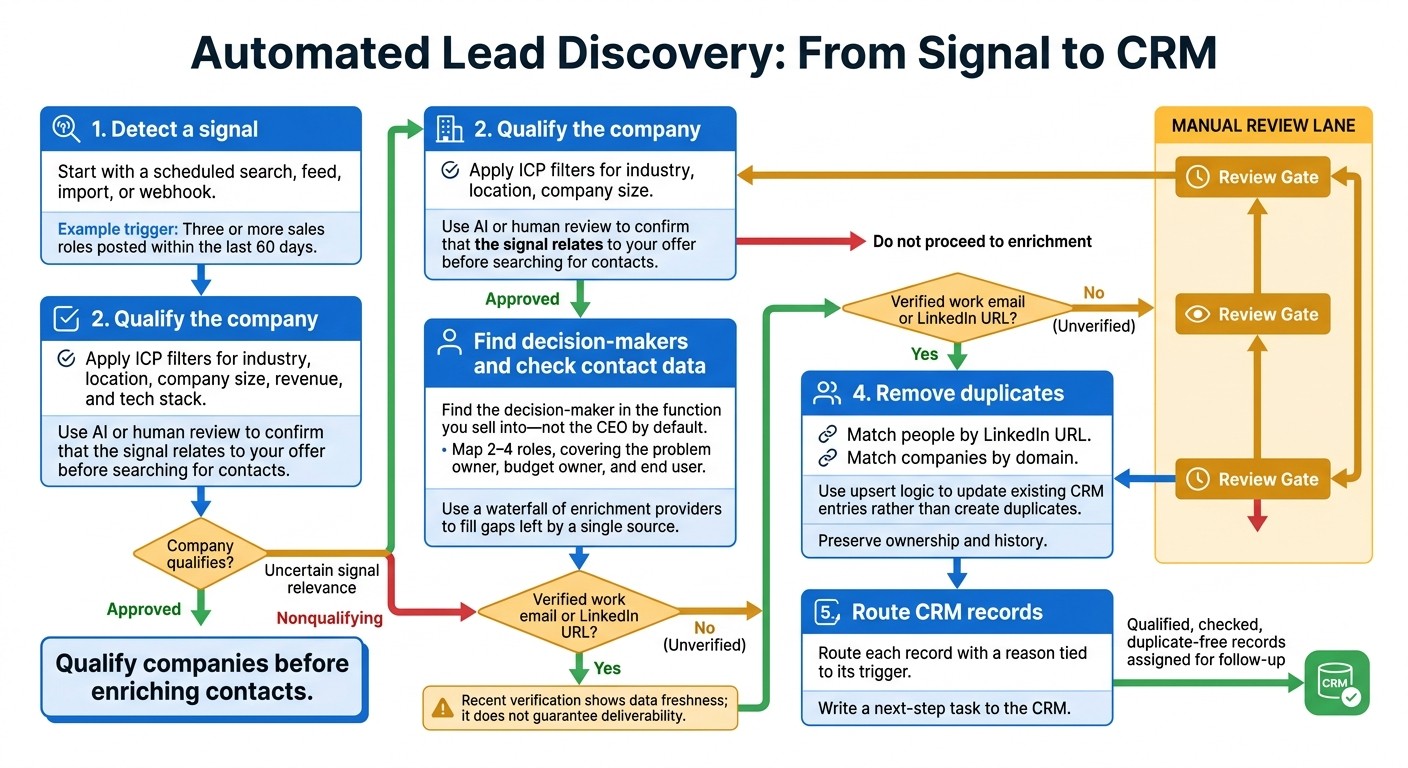
Automated Lead Discovery: From Signal to CRM
Automate lead discovery in this order: detect a signal, qualify the company, verify contacts, dedupe records, and write the next step to the CRM. K3X can handle these steps in one flow; Salesforce and HubSpot usually require more workflow and integration setup.[7][14]
Use your selected ICP rules and sources to set up triggers and company qualification first.
Set Triggers and Qualify Companies
Start with a scheduled search, feed, import, or webhook, then apply your ICP filters to qualify each company.
One trigger is three or more sales roles posted within the last 60 days.[6]
Combine filters for industry, location, company size, revenue, and tech stack. Before searching for contacts, use AI or human review to confirm that the signal relates to your offer.[16][6][1][2] Once the company qualifies, enrich only the roles that matter.
Find Decision-Makers and Check Contact Data
Find the decision-maker in the function you sell into - not the CEO by default. Match contact selection to the qualifying signal and map 2–4 roles, covering the problem owner, budget owner, and end user.[6]
Use a waterfall of enrichment providers to fill gaps left by a single source. Send records without a verified work email or LinkedIn URL to manual review; a recent verification shows how current the data is, but doesn't guarantee deliverability.[4][7][8][10][3] Deduplicate records before sending them to the CRM.
Remove Duplicates and Route CRM Records
Deduplicate people by LinkedIn URL and companies by domain. Use upsert logic to update existing CRM entries rather than create duplicates, keeping ownership and history intact.[8][17]
As the last step in the automation chain, route each record with a reason tied to its trigger and a next-step task.[17][5][14]
Set Up K3X or Connect Your Current CRM
Use K3X if you want discovery and sales execution in one platform. Keep your current CRM if its ownership rules, reporting, and integrations already work for your team.
Before connecting the company-to-contact workflow, confirm supported actions, permissions, and approval gates. This setup turns the workflow into actions your system can run, whether you use K3X or another CRM.
Configure a K3X Prompt-to-Action Agent
Start with a prompt that specifies your ICP, trigger event, decision-maker roles, and handoff rules:
Find U.S. software companies with 50–200 employees that posted at least three sales roles in the past 60 days. Exclude customers, open opportunities, staffing agencies, and suppressed domains. Find the VP of Sales and Head of Sales Operations. Record the signal source and date. Require a verified work email before routing; send uncertain results for review. Match companies by domain and contacts by LinkedIn URL. Update matches without replacing ownership. Save approved records to the Prospecting pipeline and create a review task. Do not send messages, call, or text.
Use K3X’s visual controls to inspect triggers and actions. Store signal evidence in custom fields, and check execution through activity logs.
Confirm permission to read records, update fields, and create tasks. Test the approval gate before allowing writes. Connect external tools through webhooks or native connectors, and verify that each required connector is live before relying on it.
Build the Workflow in Another CRM
If you use another CRM to run the workflow, map the same sequence into it: prospecting → enrichment → qualification → routing. Small teams usually need a CRM, a data source, a connector, and email verification.
K3X offers a simpler setup when you want discovery and routing in one system. For other platforms, check the setup requirements below.
Platform | What it does well | Setup considerations |
|---|---|---|
K3X | Built-in prospecting database, growth signals, prompt-based agents, and CRM actions | Configure prompts, permissions, and approval gates; verify connector availability |
Salesforce | Flow and validation rules with strong governance | Discovery and routing may require admin or developer help |
HubSpot | Workflows and custom properties for marketing-to-sales handoffs | Verify plan access to required workflows and external data connectors |
Pipedrive | Native automations and visual pipelines | Connect discovery and enrichment sources; configure matching and routing |
Zoho CRM | Native workflows and edition-dependent Zia enrichment | Check enrichment allowances, API access, and field mapping |
monday.com | Boards and integration recipes for visible handoffs | Connect external data tools; check automation and integration limits |
Close | Built-in email and calling | Connect prospecting data; verify workflow access and field mapping |
Attio | Flexible records, enrichment, and workflows | Define matching rules; check connector availability and workflow limits |
Test a Switch Before Migrating
Run a 15- to 50-lead pilot in a staging sheet or Airtable base before replacing your existing workflow. Preserve signal fields, verification dates, deduplication keys, suppression lists, ownership, and original CRM IDs.
Keep batch IDs separate from deduplication keys so reruns cannot create duplicates. Test imports, updates, exports, and activity-history requirements before handoff, and require human approval before writeback.
Save a pre-pilot export and change log so you can remove new records and restore changed values if you roll back. Before expanding, confirm integration coverage, access controls, and rollback steps, then use the pilot results to tighten guardrails before launch.
Check Lead Quality and Launch
Launch only after the pilot passes quality checks, spend limits are set, and a designated owner can pause the workflow. Then shift from building to monitoring.
Keep discovery separate from outreach approval. Automation at scale depends on accurate discovery, enrichment, and routing.
Track Quality and Set Guardrails
Audit 10% of records, with a minimum of 30, or every record if the pilot has fewer than 30. Check ICP fit, signal validity, decision-maker match, verified contact data, duplicates, and routing to keep poor-fit leads and bad data from wasting reps’ time.
Require a primary-source URL for every trigger summary. Reject any record for which the AI cannot supply one. [7][12]
Keep company-size and industry accuracy above 90%. If false triggers exceed 5%, pause the workflow and fix it. [8][7] Before launch, confirm that suppression rules work. [15][5][12]
Once records pass these checks, focus on failure analysis and spend control.
Fix Poor Results and Limit Usage Costs
Use failed records to tighten filters and reduce wasted credits. Log rejection reasons so filter changes address the causes.
Match domains and verified emails to catch routing errors before records go live, and reverify stale records before routing them. [9][12][4] Reveal contacts only after the company passes fit checks, and stop enrichment once the first verified contact is found. [18]
Set daily credit and retry limits before opening the workflow. Compare the total workflow cost per lead with your manual baseline.
In K3X, check prompt logic for SKIP and “none found” handling, along with actions. In Salesforce or HubSpot, check control fields and workflow conditions. Test these guardrails in practice - a prompt alone does not prove they work. [11][18]
FAQs
How do I prioritize conflicting buying signals?
Score leads separately for ICP fit and intent, using trigger recency to assess intent. Prioritize first-party intent, followed by free trigger events and then technographic shifts. Use predictive intent only when lead volume justifies it [1].
When evidence conflicts, is unclear, or is outdated, flag it for human review or pause outreach until recency and role are verified [2][3]. Keep accounts with conflicting evidence only when dated, linked proof supports the required ICP filters [2].
How can I estimate my cost per qualified lead?
Calculate cost per qualified lead by dividing your total monthly spending on data subscriptions, enrichment tools, and verification services by the number of qualified leads generated that month [1].
A typical small-team stack using Apollo, Clay, and an email verifier costs $300–$900 per month and produces 300–500 verified, signal-tagged contacts [1]. Include email verification in your costs: it runs roughly $3.70–$8.00 per 1,000 emails and helps protect your sender reputation [1].
How do I keep automated lead discovery privacy-compliant?
Make data security part of your workflow. Use reputable data vendors, sign Data Processing Agreements (DPAs) with them, and send enrichment tools only the personally identifiable information (PII) they need.
Document which data leaves your systems and set clear retention periods for prospect information. Define strict access roles for who can view or manage enrichment data, and don’t send PII to unvetted or experimental automation tools.