
The Evolution of AI Agents
I identify decision makers by starting with the team that owns the problem, then checking who controls funding, approves the purchase, and can block it. I use company websites, LinkedIn, and CRM history to find contacts, but I treat their authority as unconfirmed until I check the purchase approval process directly.
B2B buying groups usually include 6–10 stakeholders, so I build a map of buying roles rather than rely on one senior title or responsive contact.[5] My rule: <u>verify authority before planning outreach</u>, and record each role’s source, date checked, and next action.
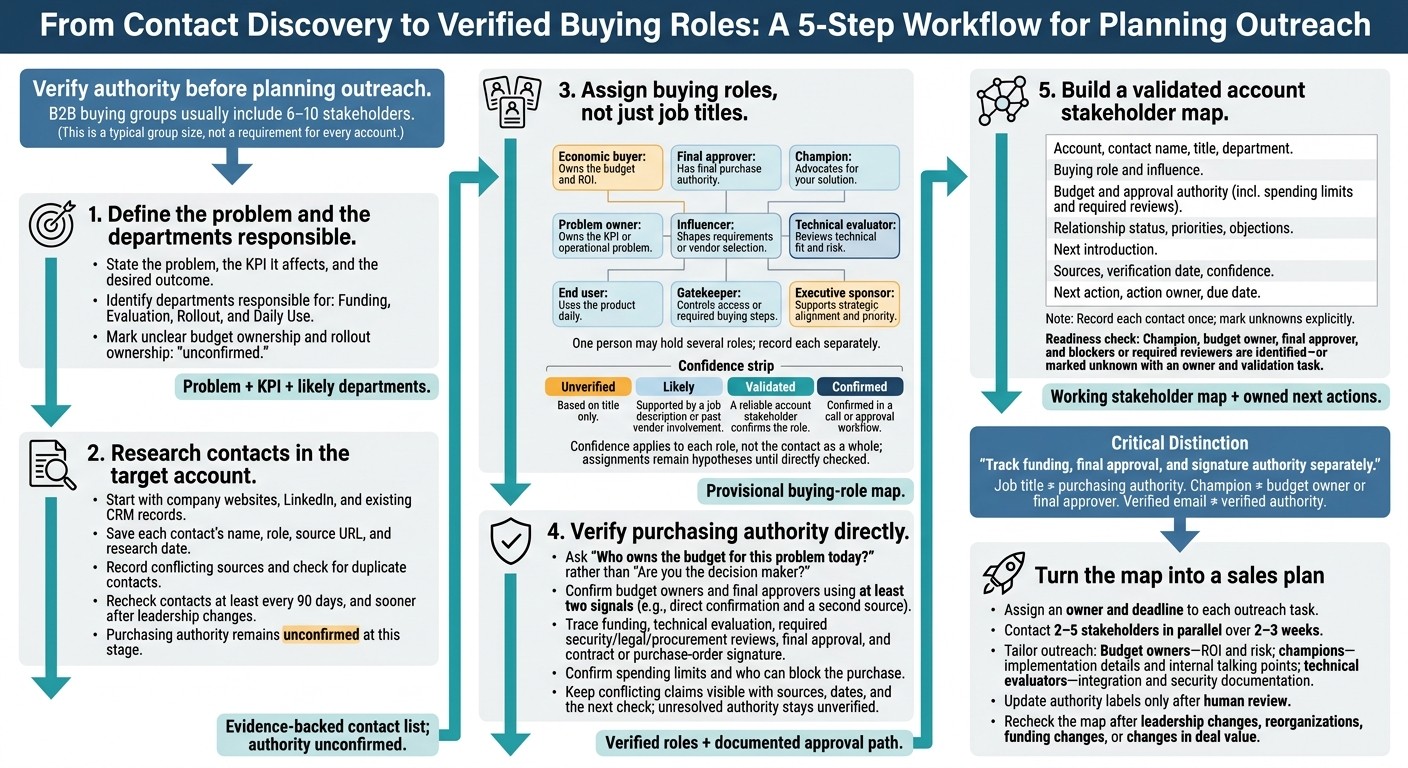
How to Identify B2B Decision Makers: 5 Steps
How to Find Decision Makers in a Company
Step 1: Define the problem and the departments responsible
State the problem, the KPI it affects, and the departments responsible for funding, evaluation, rollout, and use. In one sentence, describe the outcome the team wants and the risk it must avoid. Tie that outcome to a measurable KPI, such as revenue, conversion, cost, risk, or time-to-delivery.[10][7]
Identify the department that owns the KPI and the team that runs the process day to day. Record the likely departments responsible for funding, evaluation, rollout, and daily use. Budget ownership and final approval are separate roles: controlling the budget line does not mean someone can approve the purchase.[9]
Match the problem to likely stakeholders
For sales software, start with Sales leadership for funding, RevOps for evaluation and rollout, and SDRs or account executives as day-to-day users; for IT tools, start with IT and Security leadership, system owners, and technical users. Add Security, Legal, and Procurement when needed.[10][9]
Treat these assignments as hypotheses, not confirmed authority. A RevOps manager may become your champion because they own the workflow, while a VP of Sales may control the budget. Neither title proves purchasing power. Higher spending or risk brings more people into the approval process.[7][10]
Document the likely budget line and rollout owner. Mark either “unconfirmed” if unclear.[9] Use these initial roles to decide which contacts to verify on company sites, LinkedIn, and in CRM records, then guide your contact research in Step 2.
Step 2: Research contacts in the target account
Start with the company website, LinkedIn, and existing CRM records to find contacts in the departments identified in Step 1. Build a verified list of likely decision makers, rather than simply adding names.
For each contact, save their name, role, source URL, and research date. Leave purchasing authority unconfirmed until role verification in Step 3.
Review company websites and LinkedIn profiles
Use company websites and LinkedIn to identify possible approvers, influencers, and gatekeepers. Look beyond leadership pages: press releases can name initiative sponsors, job postings can show reporting lines and technical requirements, and procurement and security pages can explain review requirements.[4][6]
On LinkedIn, filter searches by company, function, seniority, and location. Check current employment dates, recent role changes, and posts or comments about current priorities.[4]
If sources disagree, record the conflict instead of relying on the most senior title. Recheck contacts at least every 90 days, and sooner after leadership changes.[11]
Review existing CRM records
Use CRM history to find evidence of who funds, evaluates, approves, or blocks a purchase. Review past opportunities, meeting participants, email threads, closed-lost reasons, and budget or procurement notes.
Look for people who requested security reviews, discussed funding, or introduced approvers - not just those who replied frequently.[8][6] Preserve the original notes, then check role assignments against current sources to confirm who funds, evaluates, and blocks the purchase.
Before adding a contact, search for matching email addresses and profiles in existing records to avoid duplicates.
Fill contact gaps with K3X
Use K3X only when manual research leaves missing contacts. Its plain-language search across 200M+ records can find people in relevant functions.
Check company growth signals and email verification dates before saving a match. Save source links and verification dates with each contact. A recently verified email supports contactability; it does not confirm current employment or purchasing authority.
Research capability | K3X | Salesforce, HubSpot, Pipedrive, and Zoho CRM |
|---|---|---|
Starting point | Built-in contact search plus CRM records | Existing contacts, activity, and deal history; check available enrichment features |
Search approach | Plain-language contact search | Search by existing name, title, or account; capabilities vary by product and plan |
Search, verification, and saving | Review search matches and email verification dates, then save matched contacts | Search existing records; verification, enrichment, and saving options vary by product, plan, and integration |
Contact reveals and AI actions consume K3X credits. Review matches before spending credits, and keep source links and verification dates in contact notes or custom fields. Do not assign budget ownership or final approval from discovery data alone; verify those buying roles in Step 3.
Step 3: Assign buying roles, not just job titles
Assign buying roles based on what each contact can fund, approve, influence, or block - not their seniority. Use Step 2’s contact research to build a buying-team map.
One person may hold several roles; record each separately. A champion can move the deal forward without controlling the budget or approval. Treat every assignment as a hypothesis until Step 4 confirms it directly.
Separate funding, approval, and influence
Classify contacts from Step 2 by their responsibilities in this purchase. Titles, public profiles, and past purchasing activity offer clues, but they don’t prove authority for this deal.
Buying role | Responsibility | Evidence needed |
|---|---|---|
Economic buyer | Owns the budget and ROI | Confirmed budget ownership |
Final approver | Has final purchase authority | Approval path naming the person or committee |
Champion | Advocates for your solution | Actions that move the project forward |
Problem owner | Owns the KPI or operational problem | Confirmed accountability for the metric |
Influencer | Shapes requirements or vendor selection | Documented input into the decision |
Technical evaluator | Reviews technical fit and risk | Assigned technical review responsibility |
End user | Uses the product daily | Confirmed participation in the workflow |
Gatekeeper | Controls access or required buying steps | Responsibility for a mandatory purchasing step |
Executive sponsor | Supports strategic alignment and priority | Clear support for the project |
Track funding, approval, and signature authority separately. The budget owner may not be the authorized signer. Procurement or legal may control required steps without owning the budget.
Record veto power explicitly; don’t assume every reviewer can reject the purchase. For each role assignment, also record your confidence in the evidence.
Record role confidence and source evidence
Assign a confidence level to each role, not to the contact as a whole. Use these four levels:
Unverified: Based on title only.
Likely: Supported by a job description or past vendor involvement.
Validated: A reliable account stakeholder confirms the role.
Confirmed: Confirmed in a call or approval workflow.
Store roles, confidence levels, source evidence, and approval limits in K3X contact notes or custom fields so sales can use the map. Record what each contact can and cannot approve, including who controls funding, who can reject the vendor, and who signs.
Keep AI-generated role suggestions provisional until evidence supports them. A profile or executive mention does not establish authority for this deal. Use the assignments in Step 4 to ask direct questions about who funds, reviews, and approves the purchase.
Step 4: Verify purchasing authority directly
Treat the roles from Step 3 as hypotheses and check them directly. Ask how the purchase gets approved rather than:
“Are you the decision maker?”
Confirm budget owners and final approvers using at least two signals, such as direct confirmation and a second source. A job title alone does not establish authority.
Ask who funds, reviews, and approves the purchase
Start by identifying the budget owner, then trace the approval path from evaluation to final signature. Ask:
“Who owns the budget for this problem today?”
Confirm whether funding is already set aside, who can block the purchase, and what spending limit applies.
Identify who reviews technical fit, integrations, security, and implementation. Check which procurement, legal, security, and contracting steps are required, who signs the contract or purchase order, and how long each review usually takes. Knowing the signer is not enough when required reviews remain unfinished.
Check answers against the approval process
Knowing the process does not prove purchasing authority. Check each person’s role against the approval workflow and request introductions without bypassing your contact:
“How can I help you explain this to your other stakeholders?”
Confirm responsibilities and spending limits directly with the budget owner and approver.
Record the exact answers in K3X and update the account stakeholder map alongside the role evidence from Step 3. Keep conflicting claims visible, including their sources, dates, and next check. If approval authority remains unclear, mark it as unverified rather than treating a champion’s enthusiasm as authorization.
Use the verified roles to build the stakeholder map in Step 5.
Step 5: Build a validated account stakeholder map
Use the direct answers from Step 4 to build one contact record per account and purchase. Include the buying role, supporting evidence, authority limits, and next action. Keep buying roles separate from job titles.
Record each contact once and flag missing roles. Use the structure below in your CRM or spreadsheet, and mark unknowns explicitly rather than leaving cells blank.
Fields to record | What to include |
|---|---|
Account, contact name, title, department | Company, full name, current title, and function. |
Buying role and influence | Champion, budget owner, technical evaluator, final approver, or blocker/gatekeeper. Note whether the contact recommends, shapes requirements, or blocks approval. |
Budget and approval authority | Budget controlled, contract signing or P&L responsibility, spending limit, and required reviews. Mark authority without supporting evidence as Unverified. |
Relationship status, priorities, objections | Cold, engaged, supportive, or skeptical; desired outcome and stated concerns. |
Next introduction | Introduction path needed to build consensus. |
Sources, verification date, confidence | Source links, date checked, and confidence level. |
Next action, action owner | Validation or outreach task, due date, and assigned sales rep. |
Once the fields are filled, check that every required role is covered or marked unknown.
Check whether the map is ready for sales work
A working map identifies the champion, budget owner, final approver, and any blocker or required reviewer - or marks them as unknown. Assign an owner and a validation task to every gap.
A confirmed approval path needs evidence for funding, signing authority, and required reviews.[6] Update the map as roles or purchase scope change.
Maintain the map in K3X with human review
Use K3X custom fields, notes, tasks, and dashboards to track roles, evidence, and validation. Agents can summarize research, suggest roles, manage follow-ups, and update records, but a person should verify authority before marking it confirmed.
Check support for automated gap checks, MCP connections, webhooks, and each integration before relying on them. Review the map whenever a stakeholder changes roles or the purchase scope changes.[6]
Compare CRMs for stakeholder mapping
Compare CRMs by how much manual work they require for contact discovery, buying-role tracking, source capture, and verification. Once your stakeholder map is built, test how each platform stores and maintains that information.
K3X vs. Salesforce, HubSpot, Pipedrive, and Zoho CRM
Salesforce and HubSpot support stakeholder mapping but usually need custom fields or admin setup. Pipedrive and Zoho often depend more on integrations for research and enrichment.
Platform | Contact discovery and buying-role tracking | Source capture, verification, and maintenance | Pricing and terms |
|---|---|---|---|
K3X Adaptive | Built-in database with 200M+ records, contact lookups, and AI-assisted workflows that turn research into next steps | Store roles, sources, confidence, and verification dates in notes or custom fields; human review validates authority | $399/month per team, unlimited seats, and 400,000 monthly credits; optional top-ups start at $99 for 100,000 credits |
Configurable contact and account relationships; research depends on connected data services | Detailed governance and reporting; buying-role coverage requires configuration and continued administration | Plan, add-on, and usage costs vary | |
Contact and company records with enrichment options; purchase-specific roles may need custom properties | Shared marketing and sales history supports source traceability; workflows and reporting depend on tier | Plan, add-on, and usage costs vary | |
Pipedrive | Pipeline-focused records; external data sources extend contact discovery | Custom fields store buying roles and evidence; reporting depth depends on plan and integrations | Plan and integration costs vary |
Zoho CRM | Contact records and edition-dependent enrichment options | Configurable fields and automation support verification tracking; advanced workflows vary by edition | Edition and integration costs vary |
Apply the same test to lighter CRMs: how much manual modeling will your team need to keep stakeholder data usable?
K3X vs. monday CRM, Close, and Attio
monday CRM offers visual workflow setup, Close focuses on communication history, and Attio offers a flexible relationship model. K3X supports MCP connections and webhooks and includes 3,000+ direct integrations.
Platform | Contact discovery and buying-role capture | Source traceability, verification, and maintenance | Pricing and terms |
|---|---|---|---|
K3X Adaptive | Built-in research reduces the need for separate prospecting tools | AI-assisted record updates and follow-ups can reduce admin work; human review is still needed | Team pricing and credit allowance listed above |
monday CRM | Visual boards and configurable fields; discovery depends on connected data sources | Store relationships, sources, confidence, and verification dates in board fields; maintain them through manual updates or automations | Plan and seat requirements affect cost |
Close | Contact records supported by calling, email, and SMS history | Communication history supplies evidence; buying-role relationships and verification fields need configuration | Plan and communication usage affect cost |
Attio | Flexible records and relationships, with enrichment options | Store buying roles and evidence through attributes and relationships; setup and maintenance depend on complexity | Plan and enrichment limits affect cost |
Compare pricing and total operating costs
Compare total cost, not just the subscription price. For Salesforce, HubSpot, Pipedrive, Zoho CRM, monday CRM, Close, and Attio, include add-ons, integrations, and the admin time needed to maintain stakeholder maps.
K3X credits cover AI actions, contact lookups, calling, and texting. Purchased top-up credits roll over while the plan stays active; the monthly allowance does not. When credits run out, the CRM remains available, but metered actions pause until more credits are added.
Before choosing a plan, verify current official pricing, buying-role tracking, enrichment access, and usage limits. Check that the platform can carry stakeholder data into outreach, follow-up, and approval tracking.
Turn the stakeholder map into a sales plan
Use the validated stakeholder map to assign an owner and deadline to each outreach task. Start with introductions to missing budget owners, final approvers, and evaluators along the approval path. Make the AE or SDR responsible for each introduction. [5][7]
Before outreach, confirm the problem owner, verify contacts, and document roles. Identify funding and approval responsibilities separately, and check that owners and deadlines are assigned. [5][6][7]
Contact 2–5 stakeholders in parallel over 2–3 weeks, using email, phone, and LinkedIn. Tailor the information to each role: ROI and risk for budget owners, implementation details and internal talking points for champions, and integration and security documentation for technical evaluators. [5][6][7]
Use this sequence to turn validation into planned outreach, with next actions recorded in the account plan. Update authority labels only after human review. Recheck the map after leadership changes, reorganizations, funding changes, or changes in deal value. [3][6]
FAQs
How do I verify authority if my contact won’t share the approval process?
Ask who must sign off, who owns the budget, and what could block approval. Check for budget limits, legal or security reviews, procurement requirements, and competing internal priorities.
Verify who can sign the contract or purchase order and who controls the budget. Review public company materials and LinkedIn posts about strategy or procurement. If needed, call the main line and ask a department contact or gatekeeper to connect you with the approver. Record your findings in a stakeholder map. [1][2][3]
What if stakeholders disagree about who makes the final decision?
Treat the final decision as the buying committee’s responsibility, not one person’s. Involve the budget approver, champion, and any blockers or gatekeepers rather than relying on a single answer. Ask:
“What needs to happen for this purchase to be fully approved?”
“Who else has a say before signing?”
Record who controls the budget and who can veto the purchase. Confirm each approval step before committing to one path. [1][2]
How do I reach other stakeholders without alienating my champion?
Help your champion build the internal business case rather than act like a vendor going over their head. Explain that bringing the right people in early can help the project succeed and save them time.
Ask for their guidance:
“Who else needs to evaluate how this integrates with your stack?”
Or:
“How can I help you explain this to other stakeholders?”
These questions position you as a partner in their internal selling process.