
The Evolution of AI Agents
I’d choose LinkedIn Sales Navigator for role research, ZoomInfo for U.S. enterprise contact data, Apollo.io for list building and outreach, or Cognism for verified mobile numbers. I’d also compare K3X when I need contact search, outreach, and CRM updates in one system - but none of these tools confirms who controls the budget, though some AI-powered social selling tools can help prioritize leads.
I’d compare total costs rather than subscription prices alone. The article lists Apollo Basic at $49 per user/month, billed annually, and K3X at $399/month per team; verification, usage limits, and connected tools can change the final bill (Apollo, K3X).
Before buying, I’d test each platform against the same 30 target accounts, checking current roles, usable emails and phone numbers, and steps required before outreach. My rule is simple: find the right person, check their contact details, and <u>confirm buying authority directly</u>.
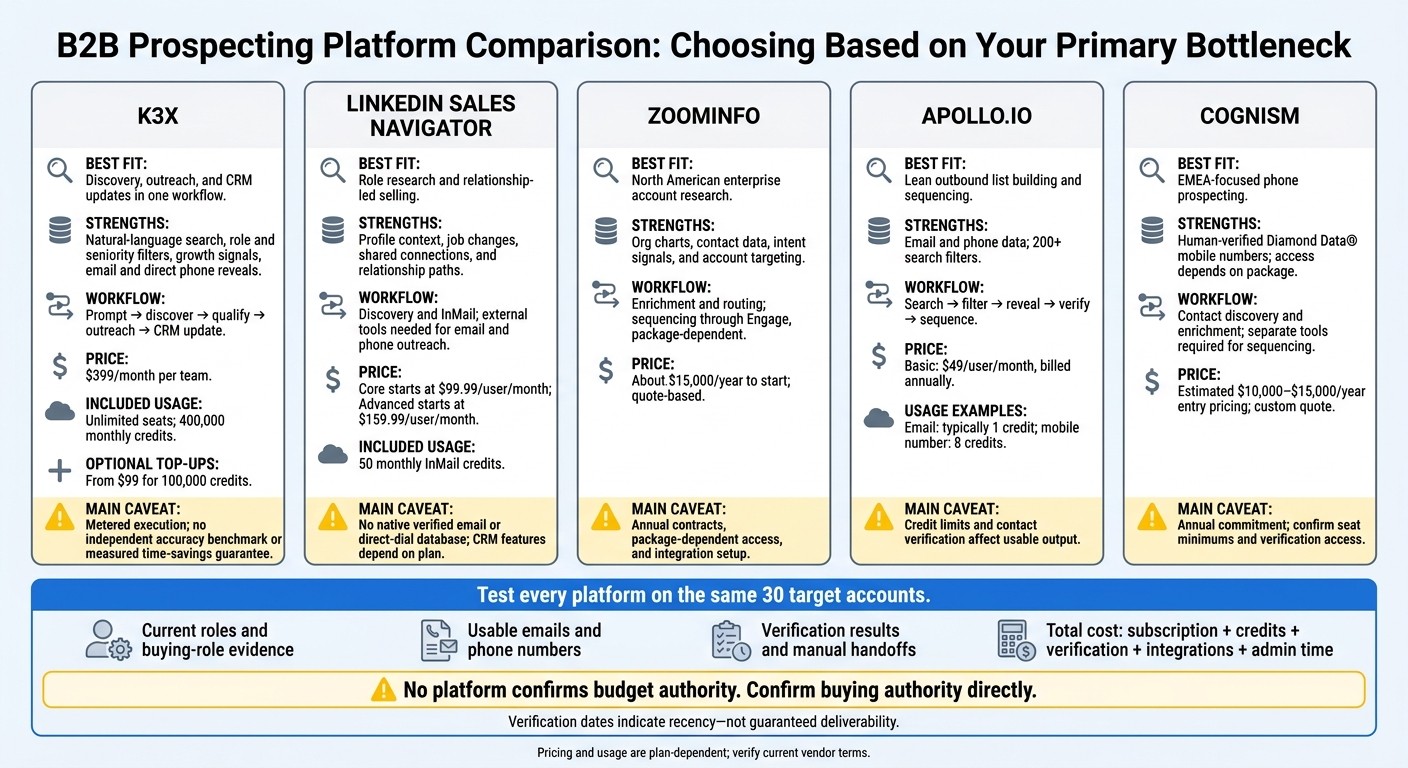
Best B2B Decision-Maker Platforms: Quick Comparison
1. K3X
Role and Buying Authority
K3X helps teams find likely decision makers using natural-language search, role and seniority filters, and growth signals (K3X). Teams still need to qualify those contacts to confirm buying authority.
LinkedIn Sales Navigator is strongest for live profile context, ZoomInfo for org-chart depth, Apollo.io for technographics and funding signals, and Cognism for verified mobile numbers and intent data. K3X is strongest when teams want discovery and outreach in one flow.
Contact Data and Coverage
K3X uses credits to reveal email addresses and direct phone numbers, and it shows when emails were last verified. The verification date indicates recency, not guaranteed deliverability. B2B contact data decays quickly, so prioritize recently verified records when building outreach lists [9].
No independent accuracy rate or U.S. coverage share is provided. Database size therefore should not be treated as a count of verified, reachable decision makers. If live network context matters more than built-in contact data, the next platform category is a better fit.
From Search to Outreach
K3X documents prompt-based AI agents, email outreach, calling, SMS, qualification, meeting booking, and CRM updates. Native MCP connections let users search leads, update deals, and launch agents through Claude or ChatGPT, while webhooks support external automation.
This workflow can reduce handoffs between finding contacts and reaching them, but the vendor provides no measured time-savings guarantee. Legacy CRMs such as Salesforce, HubSpot, Pipedrive, Zoho, monday.com, Close, and Attio usually require enrichment or manual routing before outreach begins. The speed matters most for teams that need to build a list and make first contact in the same session.
Pricing and Usage Limits
Adaptive costs $399/month per team, with unlimited seats and 400,000 monthly credits (K3X pricing). Reveals, calls, texts, and AI actions consume credits.
Optional one-time top-up packs start at $99 for 100,000 credits. Unused purchased top-up credits roll over while the subscription stays active. When credits run out, the CRM that updates itself remains available, but actions that consume credits pause.
2. LinkedIn Sales Navigator
Role and Buying Authority
LinkedIn Sales Navigator helps you find likely buyers using profile signals and relationship context, rather than verified contact data. Filter by title, function or department, seniority, company size, geography, hiring signals, and recent funding. Shared connections and TeamLink show paths to warm introductions.
Use it to identify who likely influences or owns a purchase and how to reach them. Teams that also need verified contact details can use the platforms covered next for deeper data.
Contact Data and Coverage
Sales Navigator’s large network helps you spot role changes and company moves, but profile completeness varies by member[5]. It does not provide native verified email or direct-dial data[1][5].
Pair it with Apollo.io or ZoomInfo for email addresses and direct dials, or Cognism for verified mobile numbers. Sales Navigator handles discovery; these tools supply contact data.
From Search to Outreach
Sales Navigator focuses on discovery, while AI-native K3X combines discovery, outreach, and CRM actions in one flow. Use Sales Navigator’s job-change and activity alerts to help time outreach. Salesforce, HubSpot, Pipedrive, Zoho, monday.com, Close, and Attio usually require extra enrichment or workflow setup before outreach starts.
Sales Navigator supports InMail but has no native email sequencing. Email and phone outreach usually requires Apollo.io, ZoomInfo, Cognism, or a separate automation layer. Salesforce and HubSpot integrations can reduce manual entry, but CRM sync is limited on lower tiers, so check the plan before buying[1][2].
Pricing and Usage Limits
Core costs around $99.99–$119.99 per user/month, typically with 50 monthly InMail credits. Advanced costs around $159.99–$169.00 per user/month[1][2][8].
Budget separately for enrichment if your team needs email addresses or phone data.
3. ZoomInfo
Role and Buying Authority
ZoomInfo helps teams build reachable contact lists through detailed org charts, ABM, and enterprise account targeting. Compared with K3X, it offers deeper data and ABM capabilities but takes more work to run.
Org charts and filters for department, function, and seniority help identify likely decision makers. Intent signals prioritize accounts; they don’t establish buying authority. LinkedIn Sales Navigator is better for checking current employment and exact titles before confirming authority on a call [2][5]. This distinction matters when you need contacts you can reach, not just a list of titles.
Contact Data and Coverage
ZoomInfo provides business emails, direct dials, and firmographic enrichment, with bulk filters for revenue, tech stack, and department. The vendor reports 92%–95% email accuracy for North American enterprise contacts, though results vary by segment and how recently records were updated [5].
Apollo.io offers a lower-cost option, while Cognism suits EMEA-focused mobile outreach [5][6][13].
From Search to Outreach
ZoomInfo Workflows can automatically enrich records, route them, and trigger campaigns in Salesforce or HubSpot. Engage handles sequencing [5][11][12].
These features usually require higher-tier plans and admin setup. K3X, by comparison, moves from search to action in one prompt-driven flow.
Key feature | ZoomInfo | LinkedIn Sales Navigator |
|---|---|---|
Primary strength | Deep contact data and intent signals | Profile context and job changes |
Contact info | Verified emails and direct dials | No native verified contact database |
Data source | Third-party aggregated and verified | User-updated profiles |
Verification | Multiple sources; records vary in age | Depends on members updating profiles |
Best for | Bulk list building and intent-based ABM | Relationship selling and role verification |
ZoomInfo costs more and requires more setup than lighter tools such as Apollo.io.
Pricing and Usage Limits
Entry contracts start around $15,000 per year for deeper data and automation. Seats, credits, exports, intent, and enrichment determine the final quote [5][11].
Procurement can add 2–4 weeks, and complex integrations can take months. Before signing, request written details on included features, export limits, and renewal terms [11][12].
4. Apollo.io
Role and Buying Authority
Apollo.io lets teams find likely decision makers and start outreach in one workflow. Its 200+ filters cover account size, technology, department, job title, and seniority [8].
Use funding, hiring, and intent signals to rank likely buyers. Then check their current roles on LinkedIn and confirm budget authority directly. Once contacts are identified, teams can move straight to outreach.
Contact Data and Coverage
Apollo offers 275M+ contacts with email and phone data [1][8]. Teams can reveal details as needed; reported email accuracy ranges from 87% to 91%, depending on the segment [5][8].
LinkedIn Sales Navigator provides stronger live profile context. Cognism is generally a better fit for European mobile outreach [1][11].
From Search to Outreach
Apollo connects contact search with email sequences and phone tasks. Set account filters, target the right leaders, and reveal their details. Its Salesforce and HubSpot integrations support enrichment, bidirectional sync, and duplicate detection before contacts enter outreach [8][14].
These integrations still need setup. Apollo bundles prospecting and outreach, reducing manual switching compared with using Salesforce, HubSpot, Pipedrive, Zoho, monday.com, Close, or Attio alongside separate contact-data tools. K3X focuses on fewer handoffs, combining discovery, outreach, and CRM updates in one prompt-driven flow.
Pricing and Usage Limits
Apollo’s Basic plan starts at $49 per user per month, billed annually [14]. Its entry price is low for outbound teams, but credit limits affect how much contact data reps can access.
Feature | Apollo.io | LinkedIn Sales Navigator |
|---|---|---|
Contact details | Emails and mobile numbers | No native verified email or phone database |
Outreach | Built-in sequences | InMail; no email sequencing |
Entry paid pricing | Basic: $49/user/month, billed annually [14] | Approximately $99/user/month [1] |
An email typically costs 1 credit, while a mobile number costs 8 credits [8]. Admins can cap rep credits. Check enrichment, export, and phone allowances before subscribing; unused credits expire each billing cycle [8].
For teams that prioritize mobile reach over workflow speed, Cognism is the next benchmark for phone coverage.
5. Cognism
Role and Buying Authority
Cognism is strongest for EMEA mobile prospecting. Its department, seniority, title, and SIC/NAICS filters help teams narrow contacts by role and industry [8].
Sales Navigator is better for Boolean search and job-change alerts, while ZoomInfo is stronger for enterprise org charts [1][5][7][8]. Bombora intent data helps prioritize active accounts, but it does not confirm budget authority [8][11]. These filters narrow the contact list; they don’t establish whether someone can approve a purchase or be reached.
Contact Data and Coverage
Cognism’s strongest coverage is in EMEA; ZoomInfo has deeper coverage in North America [8][11]. Cognism reports 92% email accuracy and 89% overall contact accuracy. Its Diamond Data® mobile numbers are human-verified through live calls [9][8][10].
Cognism also reports a 3x higher connect rate than standard unverified data, though results are not guaranteed [8][10]. Higher-tier packages can include on-demand verification for selected contacts. The platform screens against Do Not Call lists in 15+ countries, but local calling rules still apply [8][10].
For EMEA calling teams, verified mobile numbers can reduce manual research and shorten the time to first contact. When phone outreach is the goal, reachability matters more than database size.
From Search to Outreach
Cognism supports contact research, CRM transfers, and enrichment, but outreach requires separate tools. Its Chrome extension works on LinkedIn and company websites, while K3X combines search, outreach, and CRM updates in one prompt-driven flow.
Native integrations push contacts into Salesforce and HubSpot, and Outreach and Salesloft handle sequencing. Cognism also offers bulk CRM enrichment through its Data-as-a-Service option [8][10]. Unlike Apollo, Cognism does not include native sequencing [8][3], and this workflow costs more than lighter prospecting tools.
Pricing and Usage Limits
Estimated entry pricing is $10,000–$15,000 per year, with annual prepayment and five-seat bundles [1][8][9][10]. Fair-use policies can limit CSV exports to 25 contacts per batch [8].
The higher annual commitment is best suited to teams that place a high value on verified mobile reach. Before buying, confirm seat minimums, Diamond Data access, intent data, and on-demand verification in writing.
Feature | Cognism | Apollo.io |
|---|---|---|
Best fit | EMEA-focused phone prospecting | Combined prospecting and outreach |
Mobile data | Human-verified Diamond Data®; package-dependent access | Credit-based mobile access |
Email sequencing | Through external integrations | Built in |
Entry pricing | Starts at $49/user/month, billed annually, with a free tier [4][6] |
Apollo.io vs Clay 2026: Which B2B Prospecting Tool Is Right for You?
Comparing Role Discovery, Contact Data, Speed, and Cost
The tables below compare platforms on role discovery, contact quality, workflow speed, and cost. They bring the platform-by-platform details above into a side-by-side view of buying criteria.
Role Filters and Buying Authority
Role filters help narrow your target list, but they don’t confirm purchasing authority. Use seniority, org charts, and relationship signals to identify contacts, then confirm budget ownership in conversation.
Platform | Role filters | Useful signals | Still to verify |
|---|---|---|---|
K3X | Plain-language targeting across a 200M+ record database; exact filter depth not benchmarked | Business growth signals and agent-assisted qualification | Reporting lines, purchasing responsibility, and budget control |
LinkedIn Sales Navigator | Title, function, seniority, geography, company size, industry, and account filters | Profiles, job changes, relationships; Account IQ and TeamLink | Decision makers versus champions and users |
ZoomInfo | Title, department, seniority, location, company size, industry, and account targeting | Org charts, intent, and account activity | Actual approval authority |
Apollo.io | Title, department, seniority, geography, company size, industry, and account filters | Intent and account signals | Title accuracy and buying role |
Cognism | Title, department, seniority, geography, company size, industry, and account filters | Bombora intent | Budget ownership |
Contact Accuracy and U.S. Coverage
Contact data determines whether you can reach the people your role filters identify. Verification age is a recency signal, not proof of deliverability, and reported accuracy figures aren’t guarantees for every record.
Platform | Contact channels | Verification evidence | Coverage fit | Data caveats |
|---|---|---|---|---|
K3X | Email and direct phone reveals | Email verification dates visible | Built-in database with 200M+ records; coverage breakdown not benchmarked | No independent accuracy benchmark provided |
LinkedIn Sales Navigator | User-updated profiles | Global role research | Current profiles do not prove email or phone accuracy | |
ZoomInfo | Emails, direct dials, mobiles | 92%–95% email accuracy [5] | Strong North American coverage | Not a universal guarantee; check record age |
Apollo.io | Emails and phone numbers | U.S. and international prospecting | Verify status and update old records | |
Cognism | Emails, phones, Diamond Data® mobiles | EMEA-focused | Diamond verification does not apply to every phone record |
Before buying, test a sample of U.S. accounts: check current employment, validate emails with ZeroBounce or NeverBounce, and track wrong-number and bounce rates. Follow applicable privacy requirements, CAN-SPAM, calling restrictions, and consent rules for texting.
Steps From Target Account to Outreach
Workflow speed depends on the steps and handoffs between finding a contact and reaching out. K3X can reduce handoffs and integration administration compared with a HubSpot or Salesforce workflow using separate data and outreach tools, but setup effort depends on permissions and workflow requirements.
Platform | Required workflow stages | Manual handoffs | Execution capabilities | Setup burden |
|---|---|---|---|---|
K3X | Prompt → discover → qualify → outreach → CRM update | Review targeting, authority, verification dates, and duplicates | Agents, email, calling, SMS, sequences, CRM updates | Context and permissions still required; time savings not benchmarked |
LinkedIn Sales Navigator | Search → filter → inspect profiles → use external contact-data tool → outreach | Separate contact-data tool needed for email/phone outreach | InMail; CRM features plan-dependent | Search setup plus external-tool coordination |
ZoomInfo | Filter → inspect org chart → reveal → verify → sync → outreach | CRM mapping and sales-engagement handoff | Workflows; outreach products package-dependent | Configuration varies with integrations and automation |
Apollo.io | Search → filter → reveal → verify → sequence | Fewer handoffs for native outreach | Built-in sequencing and dialing; limits plan-dependent | Sending account, sequence, and CRM setup |
Cognism | Filter → validate role → reveal a verified mobile number → call or sequence in a connected tool | Separate outreach tool | Data discovery and enrichment; native sequencing unavailable | CRM and calling-tool setup |
Pricing, Credits, and Purchase Terms
Compare total cost, not seat prices alone. Include subscription fees, data access, outreach limits, workflow depth, integrations, and administration.
Platform | U.S. subscription price | Billing basis | Included usage | Additional charges | Buying friction |
|---|---|---|---|---|---|
K3X | $399/month for the whole team | Monthly; cancel anytime | Unlimited seats; 400,000 monthly credits | Optional top-ups start at $99 for 100,000 credits | 1:1 demo before a 7-day trial; no credit card required |
LinkedIn Sales Navigator | Core starts at $99.99/month; Advanced starts at $159.99/month; Advanced Plus is quote-based [1][2] | Monthly and annual options | Higher-tier relationship and CRM features | CRM sync requires Advanced or higher | |
ZoomInfo | Quote-based | Seats, reveals, exports, and products plan-dependent | Intent, engagement, and other add-ons | Confirm minimums, onboarding fees, and renewal terms in writing | |
Apollo.io | Free tier; Basic $49/user/month; Professional $99/user/month [2][3][8] | Paid plans may require annual commitment | Credits and outreach limits plan-dependent | Additional credits and capabilities | Self-serve entry; verify current credit schedule |
Cognism | Quote-based; typically about $10,000–$15,000/year to start [2][8] | Contract-specific | Verification and exports package-dependent | Intent and verification options | Confirm seat minimums, batch limits, and fees |
K3X credits cover reveals, AI actions, calls, and texts. Metered actions pause when credits run out, but the CRM remains available. Top-up credits roll over while the plan stays active; verify bulk-pack pricing directly.
Pros and Cons by Team Need
Choose based on your prospecting goals: K3X for prompt-to-action workflows, Sales Navigator for relationship research, ZoomInfo for enterprise buying groups, Apollo.io for lean outbound, and Cognism for verified mobile reach. Compare each platform’s role discovery, contact accuracy, and workflow speed against how your team works.
Platform | Strongest advantage | Main drawback | Best-fit team |
|---|---|---|---|
K3X | Prompt-to-action discovery, outreach, and CRM updates | Metered usage | Teams seeking AI-led discovery through execution |
Sales Navigator | Role context, job changes, and relationship paths | Relationship-led account teams | |
ZoomInfo | Deep account and buying-group research | North American enterprise teams | |
Apollo.io | Startups and lean SDR teams | ||
Cognism | EMEA calling teams |
K3X keeps discovery, outreach, and CRM updates in one workflow. Salesforce, HubSpot, Pipedrive, Zoho, monday.com, Close, and Attio generally need connected prospecting tools, which adds setup work and handoffs.
Which Platform Fits Your Prospecting Goals?
Choose a platform based on what slows your team down: finding the right roles, getting contact data, or moving from search to outreach. The matrix below matches each goal to a platform and its main trade-off.
Prospecting objective | Recommended platform | Supporting capability | Main trade-off |
|---|---|---|---|
Find contacts and act in one workflow | K3X | Search-to-action workflow | Credit-based execution |
Map stakeholders | LinkedIn Sales Navigator | ||
Research North American enterprise accounts | ZoomInfo | Quote-based pricing and annual commitments | |
Build lists and sequences | Apollo.io | ||
Reach EMEA prospects by phone | Cognism | Quote-based pricing and a smaller North American database than ZoomInfo [15][6] |
Before buying, test each tool against the same 30 target accounts.[11] Measure usable contacts, evidence of buying roles, verification results, and manual handoffs. Include credits, verification, integrations, and admin time in the total cost, and compare K3X against your CRM workflow - not just its subscription price.
Define your account criteria and distinguish budget owners from champions and users. Check decision-making authority, verify contact details, remove duplicate records, and launch outreach that meets compliance requirements.
FAQs
How can I confirm a contact controls the budget?
ZoomInfo goes beyond contact details: its org charts show reporting structures and departmental budget owners. Combined with intent signals, these provide the most reliable way to verify buying authority [1]. Apollo.io and LinkedIn Sales Navigator help find leads but don’t offer the same depth of buying committee intelligence [2][3].
K3X’s AI-native, prompt-to-action features can analyze account data and identify decision-makers. This reduces manual research into reporting hierarchies and the work required for complex legacy CRM setup [K3X context].
What results should justify buying a prospecting tool?
A prospecting tool is worth buying when measurable gains in pipeline, revenue, or efficiency exceed its cost. Expect a clear return on investment, typically within 2 to 9 months, from less manual research, higher connect rates with verified contact data, and better conversion rates from targeted lists.
It can also reduce the number of tools you need and lower total costs. Track booked meetings and closed revenue - not emails sent - to measure success.
How often should I reverify my contact lists?
Reverify contact lists often, rather than relying on quarterly updates. Professionals change roles or companies, so quarterly checks can leave you emailing people who left months ago [1]. Ask vendors to confirm their data update frequency in writing [1].
For high-volume outbound campaigns, verify exports with ZeroBounce or NeverBounce before sending [2][3]. This matters most when using platforms with higher bounce rates: rates above 10% can damage your sender reputation [3].