
The Evolution of AI Agents
I find verified B2B leads without manual research by automating company searches, filling missing contact data, checking emails, and updating matched CRM records automatically. I allow outreach only after email verification, company and role fit, and suppression checks pass - a valid address alone is not enough.
K3X groups these steps in one platform; Apollo, Clay, and Hunter offer a multi-tool path. I compare both options by total cost, verification dates, and CRM update behavior, then use a 90-day verification window as the article’s default gate - not a delivery guarantee.
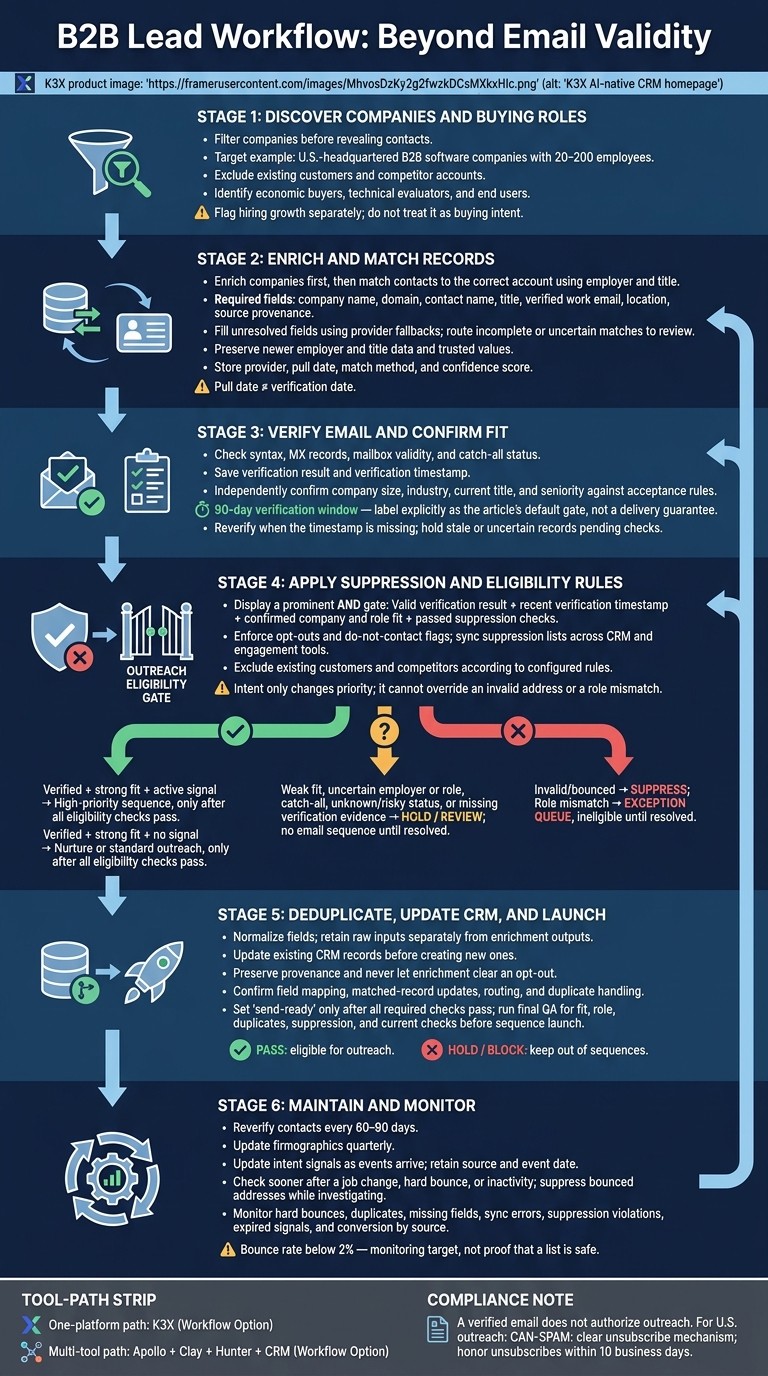
Verified B2B Leads: From Discovery to Outreach
Automated B2B Lead Gen: NEW #1 Method (n8n + Apify)
Automate Company and Decision-Maker Discovery
Filter companies before revealing contacts. Use a headcount range of 20–200 employees, and exclude existing customers and competitor accounts to avoid unnecessary enrichment spending [9].
Find Leads with K3X or Apollo
K3X supports plain-language discovery across 200M+ records, including growth signals and email-verification dates [1][2]. Apollo offers 65+ filters and 230M+ contacts for filter-based discovery [1][2].
In K3X, use the prompt below and review the results before starting outreach. In Apollo, filter by company location and headcount, save matching accounts, then search those accounts by title, seniority, and email status. Pass only verified matches into enrichment and CRM routing.
Find U.S.-headquartered B2B software companies with 20–200 employees. Identify the buying roles: economic buyers, technical evaluators, and end users. Require current verification dates. Exclude existing customers and companies currently using [Competitor Product]. Flag hiring growth separately; do not treat it as buying intent. Route records with missing verification dates or uncertain matches to review.
Map each buying role once, and check role fit and verification age before revealing or exporting contacts. Reverify contacts when the timestamp is missing. Save the Apollo search or schedule the K3X workflow, then check that each run follows the acceptance rules.
Compare K3X with CRM and Prospecting Platforms
K3X combines prompt-based discovery and AI CRM tools to manage actions in one platform. Apollo supports filter-based prospecting and sequencing, while its MCP support allows plain-language searches through connected AI tools [6].
Teams can manage basic pipelines themselves. Complex permissions, routing, and integrations take more setup time. Compare each platform’s discovery, verification, and CRM handoff against the workflow you need.
Platform | Prospect data and verification visibility | Plain-language automation, CRM, and outreach | Setup and plan-cost considerations |
|---|---|---|---|
K3X | Native database; visible email-verification dates | Native prompt-based agents, pipelines, email, calling, and SMS | Configure context and rules; $399/month per team, with usage credits |
Apollo | Native discovery and email-status filters; 65+ filters; 230M+ contacts | Filter-based discovery, sequences, CRM connections, and MCP access in AI tools | Configure searches and sequences; free tier available; paid features and limits vary |
Verified prospect data usually requires connected providers | Highly customizable CRM and automation; prospecting features depend on edition and setup | Complex deployments need more configuration; confirm edition and add-on costs | |
Verified prospect data usually requires connected providers | Connected sales and marketing tools; automation depends on tier | Basic setup can be straightforward; confirm seats, tier, and data costs | |
Verified prospect data usually requires connected providers | Pipeline-focused CRM; automation depends on plan and integrations | Suited to simpler pipelines; confirm subscription and add-ons | |
Verified prospect data usually requires connected providers | Customizable CRM; AI and automation depend on edition | Configuration varies by scope; confirm edition and integrations | |
Verified prospect data usually requires connected providers | Flexible boards and workflows; AI and outreach availability varies | Configure boards and routing; confirm seats and plan limits | |
Verified prospect data usually requires connected providers | Sales CRM with communication-focused workflows | Configure data imports and outreach; confirm plan and usage charges | |
Verified prospect data usually requires connected providers | Flexible CRM records and workflows; AI and outreach depend on plan or connections | Configure data model and workflows; confirm plan and connected services |
Compare Total Costs for Your Team
Compare costs using the same workflow, team size, and billing term, rather than CRM seat prices alone. Use current vendor quotes and include data, verification, automation, communications, and setup time.
K3X Adaptive costs $399/month for unlimited seats, with 400,000 monthly credits for metered AI actions, contact reveals, calling, and texting. Top-ups start at $99 for 100,000 credits. Purchased credits roll over while the subscription stays active; the monthly allowance does not.
CRM access remains available when credits run out, but metered actions pause. A 7-day trial follows a 1:1 demo, with no credit card required (K3X pricing).
Enrich Lead Records Automatically
After discovery, enrich only the fields needed to confirm identity, fit, and routing: you can also use AI-powered lead scoring tools to prioritize high-value prospects, company name, domain, contact name, title, verified work email, location, and source provenance. Fill missing fields and send incomplete records for review before outreach.
Set Up Enrichment and Provider Fallbacks
Start with data already in your CRM or prospecting tool, then send unresolved fields to Clay’s waterfall enrichment flow. It tries 150+ providers in sequence [4][5] and stops at the first valid record match. Hunter can find and verify missing business email addresses [5], but finding an address does not mean it’s verified.
Enrich companies first, then match contacts to the correct account using employer and title. If records conflict, keep the newer employer and title data. Store the provider, pull date, match method, and confidence score with each update [6]. The pull date shows when you fetched the data - not when the underlying information was confirmed.
Track Growth Signals and Update Outdated Data
After matching records, track changes and their dates. Store hiring, funding, and technology changes in separate signal fields, each with a source and event date. These signals add context; they don’t prove that someone is ready to buy.
Reverify contacts every 60–90 days and update firmographics quarterly [3][6]. Check sooner after a job change, hard bounce, or inactivity. Suppress bounced addresses while you investigate.
For CRM routing and routine maintenance, Apollo can sync enriched matches to Salesforce or HubSpot without manual exports [6]. Preserve newer data and its provenance, and keep uncertain matches out of outreach. Up-to-date, traceable records can then move into verification and deduplication.
Verify Emails and Check Company and Role Fit
Email verification is the last gate before outreach once enrichment fills identity fields. Send discovered addresses to Hunter or another supported verification provider to check syntax, MX records, mailbox validity, and catch-all status. A “valid” label does not guarantee delivery, confirm current employment, or establish buying intent. Save the result and verification timestamp for routing. [1][8][3]
Check Verification, Fit, and Suppression Rules
Check company and role fit separately from email status. Compare company size, industry, current title, and seniority against your acceptance rules using company data and current title fields. Title keywords signal seniority, not responsibility. Hold the record if role or employer evidence does not match, even when the email passes verification. [7][10]
After verification and fit checks, apply suppression rules before launching any sequence. A verified email does not authorize outreach. Sync suppression lists across your CRM and engagement tools, enforce opt-outs and do-not-contact flags, and exclude existing customers and competitors according to your rules. U.S. outreach must comply with CAN-SPAM, including a clear unsubscribe mechanism and honoring unsubscribes within 10 business days. [3][2]
Decide Which Records Can Enter Outreach
Create a send-ready field that requires a valid verification result, a recent verification timestamp, confirmed fit, and passed suppression checks. Only records that pass all these checks should enter outreach. Intent can increase priority, but it cannot override an invalid address or a role mismatch. [7][8]
Verification checks deliverability; intent only changes priority. Keep verification, fit, suppression, and intent in separate fields so routing stays automatic.
Verification status | ICP fit | Intent status | Next action | Sequence eligibility |
|---|---|---|---|---|
Verified | Strong | Active signal | Enroll in high-priority sequence | Eligible |
Verified | Strong | No signal | Enroll in nurture or standard outreach | Eligible |
Verified | Weak | Active signal | Route to exception queue for stakeholder check | Hold |
Catch-all | Strong | Active signal | Route to manual review or LinkedIn-only outreach | Hold |
Unknown / risky | Any | Any | Re-verify with a fallback provider | Hold |
Invalid / bounced | Any | Any | Suppress and remove | Ineligible |
Role mismatch | Any | Any | Route to exception queue | Ineligible |
Keep catch-all domains flagged and unresolved records out of email sequences until they pass verification or move to a non-email path. [8]
Deduplicate, Sync, and Maintain Lead Records
Update existing CRM records before creating new ones. Keep lead records current, relevant, and free of duplicates. Store the acquisition source, enrichment vendor, and enrichment date for audits and source-level reporting. [3][2]
Normalize Data and Update Existing Records
After verification, normalize records so deduplication and routing can run automatically. Store raw inputs separately from enrichment outputs for first name, last name, email, title, company, domain, and LinkedIn URL.
Use a waterfall approach to fill gaps without overwriting trusted values. Never let an enrichment update clear an opt-out, and keep suppression lists synced across CRM and outreach tools.
Set send-ready only after verification, fit, and suppression checks pass. Before launch, run a final QA check for fit, role, and duplicates, and confirm that each tool can update existing records rather than create duplicates.
Compare CRM Routing and Setup Options
Test record updates and duplicate handling in your workspace for K3X, Salesforce, HubSpot, Pipedrive, Zoho CRM, monday.com, Close, and Attio. Use these checks to confirm field mapping, routing, and connection requirements.
Implementation check | K3X | Salesforce / HubSpot | Pipedrive / Zoho CRM / monday.com / Close / Attio |
|---|---|---|---|
Match/update behavior | Check whether the workspace updates existing records or creates duplicates | Check which objects, fields, and workflows can update matched records | Check custom-field mapping, ownership rules, and duplicate handling |
Field mapping | Confirm writable fields and output columns | Confirm objects, fields, and permissions | Confirm custom fields and ownership mapping |
Automation triggers | Confirm prompt-driven actions and update behavior | Confirm workflow triggers and routing rules | Confirm workflow triggers and routing rules |
External dependencies | Confirm connected data sources and any middleware | Confirm connectors or middleware needed | Confirm connectors or middleware needed |
After syncing, keep records current enough for outreach and routing.
Check Data Age and Complete the Launch Checklist
Update firmographics quarterly and intent signals as events arrive. [3] Recheck older records before high-volume outreach, and hold contacts after bounces or job changes.
Monitor hard bounces, duplicates, missing fields, sync errors, suppression violations, expired signals, and conversion by source. A bounce rate below 2% is a monitoring target - not proof that a list is safe. [3][7]
Launch checklist: Apply ICP criteria and exclusions; confirm company and role fit; complete enrichment; verify that checks are current; resolve duplicates; check suppression; record data dates; confirm CRM updates; and hold blocked records. Keep blocked records out of sequences until the exception is resolved.
FAQs
How can I test lead quality before scaling outreach?
Validate leads before launch instead of relying on bulk lists. Use negative ideal customer profile (ICP) criteria to exclude poor-fit accounts, then verify emails through multiple providers in sequence to keep the bounce rate below 3%.
Score each lead on firmographic fit, intent signals such as funding or hiring, and reachability. Before activating the full outreach sequence, manually review a small batch for data accuracy and personalization relevance.
What should I do when data providers disagree?
Use waterfall enrichment rather than relying on one source: query providers one at a time until one returns a valid result. This increases find rates and cuts costs by paying only for successful lookups.
Verify contact data with dedicated tools to protect deliverability, and review conflicting information manually. Record each contact’s data source and match method so your RevOps team can audit the data and judge its reliability.
How can I measure my cost per qualified lead?
Calculate cost per qualified lead by dividing your total spending on verified enrichment, email verification, and enrichment credits by the number of leads that pass your qualification score threshold.
Before outreach, apply ICP filters, fill missing fields through enrichment, and verify emails to exclude invalid addresses and high-risk catch-all addresses. Count only leads that meet your score threshold.
Track bounce rates by list and source. If a rate exceeds your tolerance - for example, around 2% - pause outreach and re-verify the affected list.