
The Evolution of AI Agents
I contact high-fit leads with recent buying signals first, placing direct requests ahead of inferred interest. Buying signals set my contact order; they do not confirm purchase readiness. I use the first conversation to check need, who controls the budget, and timing.
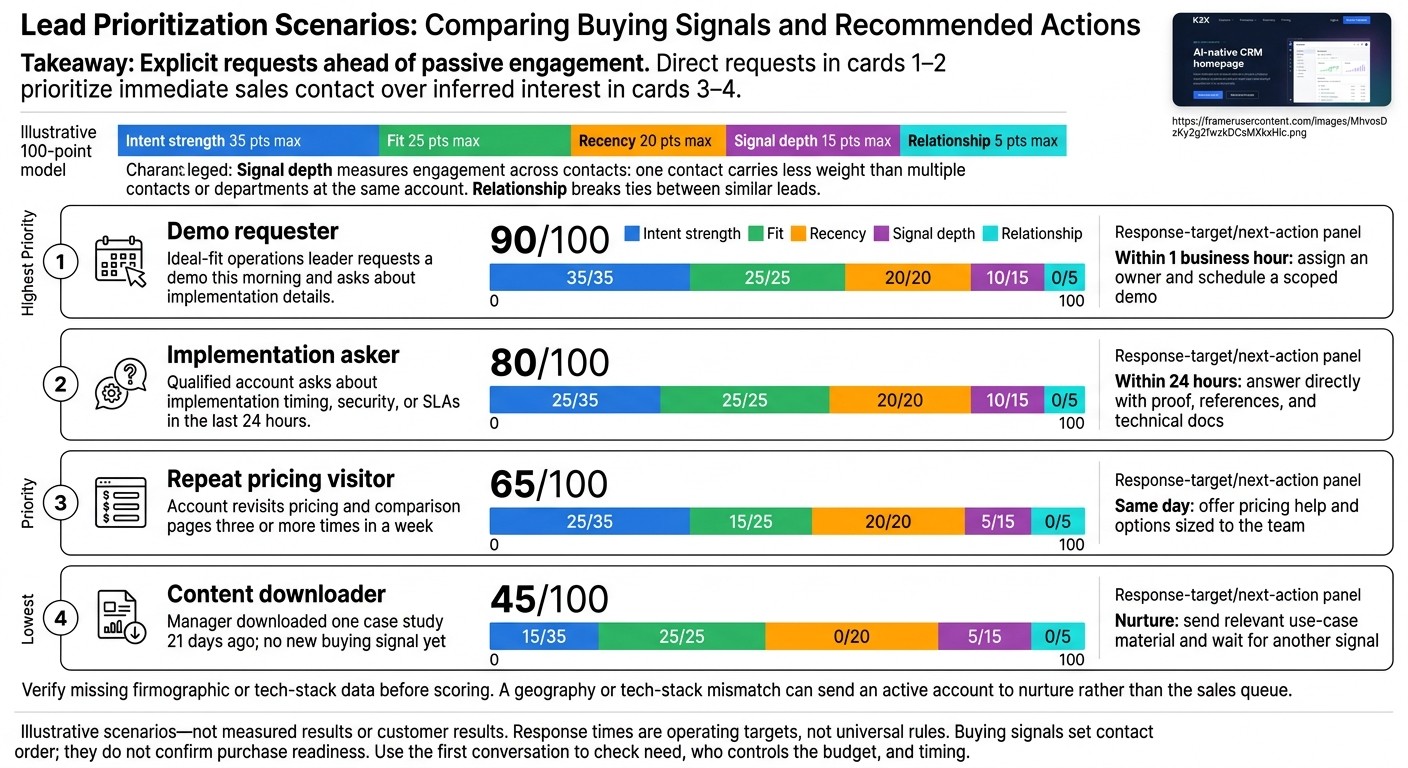
The article’s illustrative 100-point model scores a demo requester at 90, compared with 45 for a lead whose only action was downloading a case study 21 days ago. I treat those scores as examples - not measured results - and keep <u>explicit requests ahead of passive engagement</u>.
I then use a CRM to assign an owner and track follow-up. Whether I use K3X, Salesforce, or HubSpot, I check which signals require integrations and review whether my rankings lead to qualified opportunities, not just more activity.
How Top SMB Reps Use Buying Signals to Build More Pipeline
Build a Lead Contact Priority Order
Buying Signals: Which Leads to Contact First
Rank qualified leads by fit, intent, recency, and signal depth to decide who gets contacted first. Assess fit using company size, industry, use case, geography, and tech stack. A geography or tech-stack mismatch can send an active account to nurture rather than the sales queue. Verify missing firmographic or tech-stack data before scoring. You can also leverage AI-powered lead scoring tools to automate this prioritization. [9][6]
Scoring Table: Rank 4 Leads by Contact Priority
Use this illustrative 100-point model to turn buying signals into a contact queue: intent strength (35), fit (25), recency (20), signal depth (15), and relationship (5). Signal depth measures engagement across contacts: one contact carries less weight than multiple contacts or departments at the same account. Relationship breaks ties between similar leads. These scenarios are examples, not customer results. [1][9]
Contact order
Behavior and decision context
Intent /35
Recency /20
Fit /25
Signal depth /15
Relationship /5
Total
Response target and next action
1: Demo requester
Ideal-fit operations leader requests a demo this morning and asks about implementation details.
35
20
25
10
0
90
Within 1 business hour: assign an owner and schedule a scoped demo
2: Implementation asker
Qualified account asks about implementation timing, security, or SLAs in the last 24 hours.
25
20
25
10
0
80
Within 24 hours: answer directly with proof, references, and technical docs
3: Repeat pricing visitor
Account revisits pricing and comparison pages three or more times in a week
25
20
15
5
0
65
Same day: offer pricing help and options sized to the team
4: Content downloader
Manager downloaded one case study 21 days ago; no new buying signal yet
15
0
25
5
0
45
Nurture: send relevant use-case material and wait for another signal
Treat response times as operating targets, not universal rules. Explicit requests warrant faster handling than inferred interest. Review results monthly and compare outcomes by signal type and actual response time. Reduce the weight of pricing activity if it produces few qualified meetings; increase the weight of implementation questions if they consistently create pipeline. [1][2]
Match Outreach to the Buying Signal
Match each message to the action the buyer took, and use the conversation to verify intent - not the score alone. For demo requesters, confirm goals, stakeholders, scope, integrations, and timing before presenting features.
For implementation askers, provide proof of results and answer technical or procurement questions directly. Help repeat pricing visitors compare options and estimate costs for their team size.
Send content downloaders useful material tied to the same use case instead of pushing for a meeting. Place them in automated nurture until another commercial signal appears, and use the priority order to guide the handoff to CRM routing and improve lead conversion rates with automation.
How K3X and Other CRMs Turn Buying Signals Into Action
After ranking leads, a CRM should route the highest-priority contacts and trigger follow-up automatically. K3X uses AI agents to send outreach and update records, while Salesforce, HubSpot, and other platforms combine scoring, workflows, and integrations.
The main difference is whether buying signals are native or supplied through integrations. Choose a CRM that turns your lead rankings into fast routing and follow-up.
CRM Feature and Pricing Comparison
The table distinguishes native features from configured workflows and connected services. It also shows how each platform handles scoring, outreach, setup, and pricing.
Platform | Native prospect data and signals | Scoring, routing, and record updates | AI actions and outreach | Setup and pricing basis |
|---|---|---|---|---|
K3X | 200M+ records, growth signals, and email-verification dates; connected behavioral signals | AI-driven qualification, tasks, and pipeline updates | AI agents for email, calling, and SMS | Prompt-based setup; $399/month, unlimited seats, 400,000 monthly credits |
Salesforce | Connected enrichment and third-party intent data | Configured Flow routing and updates; tier-dependent Einstein scoring | Product- and license-dependent AI and outreach | Per-user licensing, configured workflows, and add-ons |
HubSpot | First-party inbound tracking; no comparable bundled prospect database | Plan-dependent lead scoring and workflows | Plan-dependent email and AI tools | Seat-based tiers; advanced automation in Professional or Enterprise |
Native pipeline activity and connected external signals | Visual pipelines and automation; add-on scoring | AI Sales Assistant and email tools | Per-seat plans and add-ons | |
CRM activity and connected signals | Configured rules and tier-dependent Zia scoring | Zia assistance and multichannel tools | Per-user plans with tier-based features | |
Board data and connected signals | Custom score fields and automation-based routing | AI assistance and connected channels | No-code boards, seat-based plans, and automation limits | |
Native communication activity and connected buying signals | Lead filtering and workflow-based follow-up | Native email, calling, SMS, and AI call summaries | Per-user subscriptions and usage charges | |
Synced and API-connected data; no bundled prospect database | Custom attributes and workflows | AI-supported workflows and configured outreach | Flexible data model and per-seat plans |
K3X Setup and Competitor Strengths
K3X’s visual workflows, webhooks, and native Claude/ChatGPT connections help teams act on ranked leads without manually building every workflow. Pricing-page visits require a working tracking connection with the appropriate permissions, and outreach needs human review.
K3X’s 3,000+ integrations are still rolling out, so not every connector is live yet.
For recent demo requests, AI agents can initiate follow-up and update records; for connected pricing visits or implementation questions, they can act on the assigned priority.
Salesforce offers deeper enterprise controls, and HubSpot supports inbound tracking. Pipedrive focuses on pipeline management; Zoho offers feature breadth; monday CRM supports no-code automation; Close provides outbound communication tools; and Attio supports flexible data modeling.
Automation shortens response time, while review helps keep lead rankings accurate as signals change.
Compare Team Cost
K3X costs $399/month for a 10-person team or a larger one, with unlimited seats and 400,000 monthly credits. AI actions, contact reveals, calling, and texting consume credits; optional top-ups start at $99 for 100,000 credits.
Purchased credits roll over while the subscription stays active, but the monthly allowance does not. When credits run out, credit-consuming actions pause; the CRM remains available. A 7-day trial follows a one-to-one demo, with no credit card required.
Competitors charge primarily per seat, with added costs for advanced features, integrations, or usage. Compare seats, usage, integrations, and admin costs alongside setup effort and response speed to see what it will cost to act on your contact rankings.
Keep Lead Priorities Accurate Over Time
Keep lead priorities current with a fixed rescoring schedule: re-score daily, review top accounts weekly, and audit weights monthly. Score intent, recency, fit, and decision role - not activity volume - so yesterday’s intent doesn’t outrank today’s. [3][1][6]
Move stale leads to nurture after 30–90 days without new activity or when their scores fall below the threshold. Restore priority when new buying behavior appears. [3][1][6]
Set Routing Rules and Use Human Review
Use ICP fit as a yes/no gate, then rank qualifying leads by purchase intent. This keeps high-intent leads from waiting behind stale records. Document each signal, its owner, and the response deadline. [8][10][1][7]
Create same-day outreach tasks for Tier 1 leads. Route open opportunities to the current opportunity owner and customer accounts to customer success. [8][10][1][7]
Send weak signals, anonymous traffic, and accounts without an owner to a manual triage queue. Route competitor accounts to competitive intelligence or remove them. [9][4][7]
Measure Results and Adjust Lead Scores
Test whether the contact priority order works by tracking time from first signal to opportunity, lead-to-opportunity conversion, median cycle length, and time to disqualify. Break these metrics down by signal and priority band. [10][5]
Record whether reps confirmed a budget path and purchase timing. Leads without that confirmation should not remain at the top of the queue. [10][5]
Compare the four weeks after a scoring change with the prior four-week period, controlling for source and segment. Increase weights for signals that predict opportunities and wins - not clicks. [10][11][2]
FAQs
How do I spot misleading buying signals?
Check ideal customer profile fit first, then separate purchase intent from passive engagement. A single email open, newsletter signup, or careers page visit belongs in nurture - not sales outreach.
Give older signals less weight. Look for multiple stakeholders engaging with pricing, security, or implementation content within a short window.
Confirm budget, decision-making authority, and purchase timing in a brief conversation rather than relying only on AI scores. Treat third-party lead-generation form fills with caution.
How should I weigh conflicting buying signals?
Exclude accounts outside your Ideal Customer Profile (ICP) first. For leads that fit, prioritize recent signals, followed by closer ICP fit, then reachability. A recent signal takes priority over a better-fit account with no current activity.
Use a 100-point model to score signal strength. Demo requests and pricing page visits should score higher than blog views and email opens. Multiple signals increase priority; leads with weak or older signals belong in nurture, not immediate outreach.
How do I set a lead score cutoff for outreach?
Avoid a universal cutoff. Exclude accounts outside your Ideal Customer Profile (ICP), multiply fit by intent, and reduce each signal’s weight as it ages. Expired signals should no longer affect scores.
Re-sort accounts every morning and prioritize outreach by score:
75–100 points: Contact immediately. These accounts combine recent, high-intent signals with strong fit.
50–74 points: Prospect strong-fit accounts without active signals.
Below 50 points: Work accounts with aging signals or marginal fit after higher-scoring tiers, or place them in nurture.